Our reviewers evaluate career opinion pieces independently. Learn how we stay transparent, our methodology, and tell us about anything we missed.

Our reviewers evaluate career opinion pieces independently. Learn how we stay transparent, our methodology, and tell us about anything we missed.
Most teams don’t decide to “ignore lifecycle management.” They just accumulate documents the way a garage accumulates boxes: one quick drop here, one “temporary” copy there, and suddenly nobody knows what’s current, what’s approved, or what’s safe to use.
I’ve watched this happen in otherwise high-functioning teams. A policy gets updated, but an old PDF keeps circulating, a procedure changes, but training still points to the previous version, and then someone asks a simple question like, “What was in effect last quarter?” and it turns into a scavenger hunt.
That’s why I think of lifecycle management as the operating system behind your docs. It’s the structure that keeps creation, review, publishing, updates, and retirement from becoming a series of one-off decisions that only exist in people’s heads.
Document lifecycle management is the end-to-end system I use to keep documents under control from creation through retirement. That includes drafting, reviewing, approving, storing, distributing, updating, archiving, or making them obsolete. The goal isn’t just control for the sake of control. It’s to keep documents accurate, accessible, and secure while still making them easy for humans to work with.
I’ve seen what happens when teams skip this and just “figure it out as they go.” Documents pile up, outdated versions float around, and no one’s sure what’s official anymore. Lifecycle management prevents that slow drift into chaos.
If you’re building a broader documentation governance program, lifecycle management sits right alongside document control and version control. It’s the structure that makes the whole system sustainable instead of reactive.
If you want the “control” angle first, these two articles pair with the one you’re reading right now: Document Control Process and Document Version Control.
Most teams struggle because they can’t trust documents, can’t find them, or can’t tell what’s current.
Lifecycle management prevents the classic failure modes: outdated SOPs living in shared drives, “final” versions being emailed around, and knowledge getting trapped in private folders. It also supports audit readiness, because you can show a clean history of approvals, changes, and retention.
When lifecycle management is working, the payoff shows up fast in day-to-day operations. You get less rework because people stop acting on stale information, and you get fewer interruptions because retrieval is easier.
It also strengthens security and compliance by enforcing change control, access control, and retention policies. Even in non-regulated companies, that structure protects document integrity and makes cross-team collaboration smoother.
Different organizations name these stages differently, but the underlying flow is almost always the same. I design the lifecycle so every stage answers one simple question: is this document safe and ready for its next step?
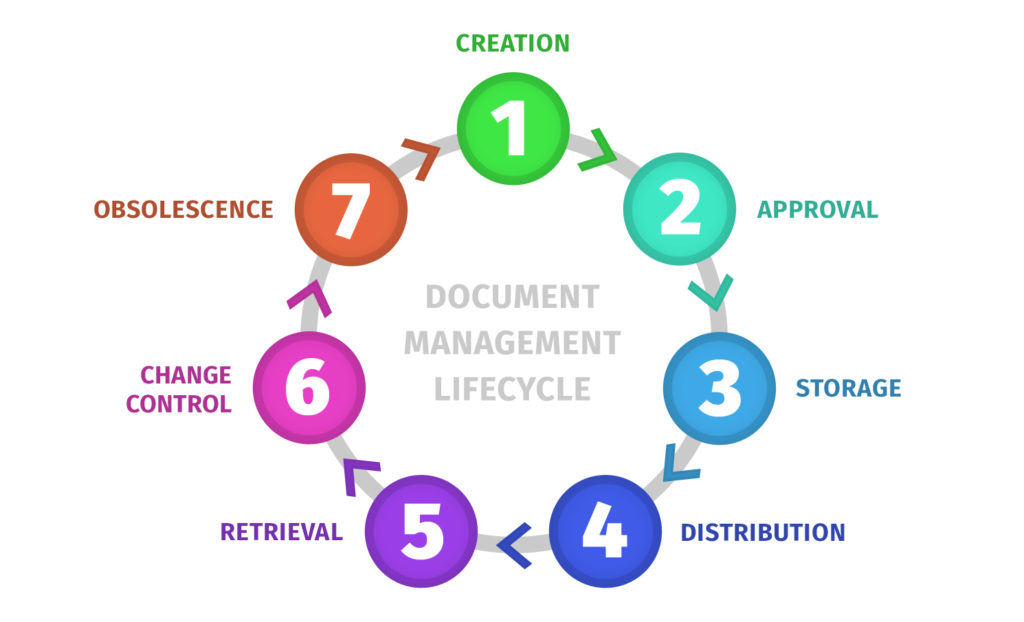
This is where the document is written and structured, using templates and consistent naming conventions. The big mistake at this stage is letting every team invent its own format, because that creates retrieval pain later.
If you’re building a standard approach, it helps to align this with your wider documentation strategy. A good umbrella read is document management, if your org is trying to mature beyond “files in folders.”
Review is where accuracy gets validated, and approval is where the organization accepts the content. When this is unclear, teams tend to treat “someone skimmed it in Slack” as approval, which is how outdated processes become “official.”
If you want a structured approach to approval workflows and control, this complements the lifecycle view: Document Control Procedures.
Once a document is approved, it needs a home that behaves like a single source of truth. Centralized storage is less about the tool and more about the rule: everyone should know where the current version lives, and that location should be reliable.
This is also where metadata indexing and structured storage become real multipliers. When search works, people stop creating shadow copies “just in case.”
Distribution is how users access the document, and retrieval is how they find it when they need it. The most effective lifecycle systems rely on linking to the source of truth instead of sharing attachments.
This is where user permissions and role-based access control matter, because “easy access” can’t come at the cost of security or compliance.
Change control defines how updates happen, and versioning ensures changes don’t erase history. Without these, you get version confusion and painful “which doc is correct?” debates that waste time and create risk.
Documents become obsolete, even if they were once critical. Archiving and retention policies help you keep an evidence trail without cluttering daily work, which is important for both usability and compliance.
This is also where long-term archival and backup practices come into play. The goal is to preserve what you need, retire what you don’t, and keep the system clean enough that people trust it.
Finally, here are the leading technical writing courses that you can take to bolster your technical writing skills.
I’ve seen lifecycle management done in paper-based systems, spreadsheet-driven systems, and digital platforms. Each approach can work, but the tradeoffs become obvious as the organization grows.
Traditional approaches rely on physical copies, manual sign-offs, and folder structures on shared drives. They can work well in small environments, but they become brittle when you add remote work, multiple departments, or strict compliance requirements.
The biggest problem is traceability. When approvals and changes aren’t captured automatically, audit readiness turns into a manual scavenger hunt.
Modern lifecycle management is supported by cloud-based systems, structured workflows, and role-based permissions. The benefit is not just convenience, but reliability: version history, access control, and audit trails become part of normal work.
Modern systems also support collaborative processing, which matters when multiple stakeholders need to review, comment, and approve without creating duplicate files.
Digital tools don’t replace lifecycle management, but they can enforce it. The systems I see most often fall into a few buckets, each with a different maturity level.
Tools like Google Docs, Microsoft 365, OneDrive, and Google Drive make collaboration and version history easier. The risk is uncontrolled distribution, because downloaded files and emailed attachments can become “shadow truth.”
Teams succeed here when they enforce linking to the source of truth, lock published versions as read-only, and use clear permissions.
A knowledge base is often the most user-friendly way to publish documents that are frequently read. It’s effective when paired with metadata tagging, good navigation, and advanced search.
If your team is trying to figure out the “system” layer, this pairs well with what a document management system is, as it helps clarify which features matter.
In regulated contexts, teams often move toward an eQMS system or a document control platform that supports auditable sharing, access control, and stronger authentication. If your organization handles requirements such as FDA 21 CFR Part 11 or ISO frameworks, these features stop being “nice to have” and become necessary.
The key is not choosing the fanciest system. It’s about choosing a tool that enforces your workflow without encouraging workarounds.
Lifecycle management becomes more structured as compliance requirements increase. In practice, compliance pressures manifest as requirements for document controls, authenticity, change controls, and a clear definition of the “current version.”
Standards like ISO 9001 requirements for documented information and ISO 13485 international standard in the medical device industry often push organizations toward consistent review cycles, controlled distribution, and defined retention. Regulated environments also tend to require stronger access controls, audit readiness, and evidence that stakeholders followed the approved process.
This is the checklist I use when I want lifecycle management to work long-term, not just during rollout week. These practices reduce version confusion, strengthen security, and make retrieval easier without turning the system into a bureaucratic maze.
Consistent naming conventions make documents easier to find and harder to misuse. I like naming systems that include an identifier, a clear title, and a status indicator when needed.
If your org needs a scalable approach, this is the most relevant companion: Document Control Numbering.
Permissions should be role-based whenever possible because they scale and are easier to audit. I also stick to the principle of least privilege, meaning users get only the access they need to do their work.
A clean model usually maps to levels like:
I don’t believe change control should be a heroic act. If your system only works when someone manually chases approvals and double-checks every file, it’s broken. The best workflows make it simple to request a change, review it, approve it, and publish it as the new official version.
Data security doesn’t have to be overcomplicated, but it does need to be intentional. This is where encryption, access control, and security policies protect sensitive documents without blocking everyday work.
If your team is working around the system, it’s a sign your controls are too tight or too confusing, not that your team is “undisciplined.”
Lifecycle management fails when retrieval is slow. If people can’t find the document in 30 seconds, they’ll rely on memory or old downloads.
Metadata tagging, consistent structures, and advanced search capabilities are what keep retrieval fast as the repository grows.
Training is what keeps lifecycle management from becoming “a thing we set up once.” I train people on how to use the system and why it matters, then I reinforce it through review cycles and reminders.
If a document is important enough to control, it’s important enough to keep up to date.
Document lifecycle management is a system that becomes more valuable as your organization grows. It keeps documents trustworthy, makes retrieval easy, supports compliance, and reduces the kind of version confusion that causes mistakes.
If you want it to stick, keep it practical: standardize naming, centralize storage, enforce role-based permissions, build change control into the workflow, and use tools to enforce what you’ve already defined. That combination is what keeps documents accurate, secure, and usable over time.
Here I answer the most frequently asked questions about document lifecycle management.
Lifecycle management covers the full journey of a document from creation to archiving. Document control focuses on controls that ensure documents are compliant and trustworthy, such as approvals, permissions, distribution rules, and audit trails.
The biggest mistake is letting documents live in too many places. The moment you have multiple “official” sources, people stop trusting the system and start building their own.
Centralizing storage and enforcing a source-of-truth distribution are the fastest fixes.
Yes, but it should be lightweight. Early on, lifecycle management can be as simple as a centralized repository, clear naming, basic permissions, and a consistent review rhythm.
As the company grows, you add structure where the risk and complexity demand it.
Get the weekly newsletter keeping 23,000+ technical writers in the loop.
Learn documentation engineering and advance your career.
Please check your email for a confirmation message shortly.





















Get our #1 industry rated weekly technical writing reads newsletter.
Your syllabus has been sent to your email