Our reviewers evaluate career pieces independently. Learn how we stay transparent, our methodology, and tell us about anything we missed.

Home › What is Documentation? The… ›
Our reviewers evaluate career pieces independently. Learn how we stay transparent, our methodology, and tell us about anything we missed.
Process documentation is the practice of recording and detailing the steps, workflows, and procedures involved in completing a task or business process. It is a reference guide to ensure consistency, efficiency, and standardization across an organization.
This type of documentation can include step-by-step instructions, flowcharts, checklists, and guidelines, making it easier for employees to follow complex processes correctly. Process documentation is essential for training new employees, improving operational efficiency, and ensuring compliance with company policies or industry regulations.
For example, a company may document its customer support workflow, outlining how tickets are received, assigned, and resolved. This documentation helps support teams maintain consistency and reduces the risk of errors, ultimately improving customer satisfaction.
Process documentation helps all major and minor stakeholders understand how a business or technical process works.
The documents included in the process are:
The purpose of the documentation is to open the process up to all stakeholders and invite input for process improvement. Doing this helps departments optimize processes and instill consistency.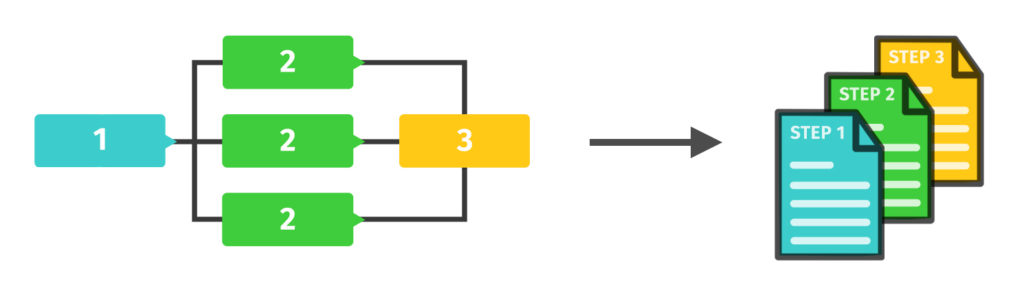
Process documentation captures one of the most important types of technical writing. Depending on the company producing it, it has varying templates.
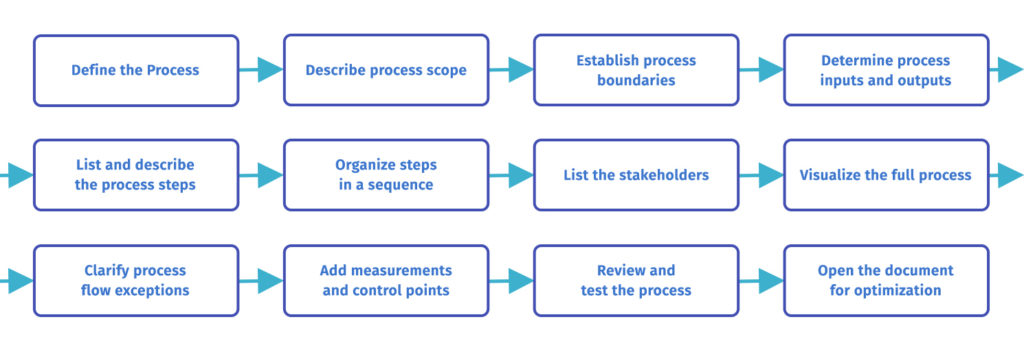
Here’s a detailed guide on how to put together a process document for any department.
Before developing documents, decide on which process to document first.
Once done, define it in as much detail as possible, including the document’s purpose, how it benefits the company, and how the process can be improved over time.
Create a separate document with these details for guidance during the primary business process documentation.
Once you have a clear description and purpose, work on defining the short and long-term project scope.
The project scope consists of basic details such as the number of tasks and whether each task will cover a single business process or a series of processes.
The scope should also be a separate document, especially for more complicated processes that will have a bigger impact on business outcomes.
Describe the parameters and boundaries of the actual process, including the starting and endpoints, as well as what causes the process to start and end.
Define each trigger in detail. This will allow all stakeholders to plan successive processes around this one and gauge whether automation can streamline the process.
Additionally, define the start and end point of each step of the process. This will allow the technical staff to see if the number of steps can be reduced to reach the decided outcome.
If you want to become an expert at creating comprehensive process documentation, check out our technical writing certification courses.

Explain the number and types of resources needed to perform each step.
This will help the resource management team determine how to structure the resource input for maximum gain and project the cost-to-benefit ratio for each process step.
In the long run, process owners and company leadership can track these numbers to optimize current processes and make smarter process decisions.
Once you have the process foundation, start brainstorming the activities and operations needed to complete each step.
Some companies take this step before establishing process boundaries while documenting. This may be according to their standard operating procedures, although it’s preferred to establish boundaries first so that any step doesn’t take up more time and resources than necessary.
The brainstorming part of the process should include all the people with extensive know-how of the company’s business needs, documenting SOPs and all the different ongoing processes.
The next step is to organize the steps into the optimal sequence to create a smooth workflow.
To do this, consider which step follows which. Devise ways to reduce the gap between each step by implementing more efficient activities.
While doing this, identify which steps follow each other and which go together as parallel activities. Group the latter ones together, and if a step contains more than one activity (or two conjoined ones), break it up into two steps.
Describe all the staff members involved in the process (and process documentation). Define their roles in the process and mention their official titles and their individual progress.
While listing the personnel, clarify each person’s roles according to their referential capacity in case they want to reference the document later.
An important part of creating an effective document is visualizing the full process and optimizing it from a visual standpoint.
This will create a mental flowchart of the process in your mind and improve its readability and clarity.
If the documentation is graphic-heavy, create a uniform image of the full process in your mind and create all the charts, metrics, and diagrams according to one design principle.
Considering future process modifications, it’s important to mention any and all steps that might be exceptions to the ones listed in the documentation.
This is a future-proofing method that allows the process to be streamlined in the future. If a new tech product or automation measure comes up, process owners need to be able to implement it without causing extensive revisions.
Identify the areas in the process that are most prone to risks and insert control points to help key process personnel monitor (and modify) the process as needed.
Also, create measurement procedures that determine the overall effectiveness of the process. This allows key stakeholders to track the process’s performance and implement improvements that best suit the process flow.
Once you have completed the process, bring together all the stakeholders and review the documentation.
Open the process map to suggestions and critique and look for missing steps, miscalculations, steps out of order, or general errors. Once the process is ready, test it and check if anything is missing or consuming more resources than necessary.
Lastly, take the completed process documentation set and send it to technical experts for review and optimization.
Your process documents guide the process and inform everyone involved of its expected outcomes at every stage. Continue making adjustments as you identify more streamlined activities.
Process documentation benefits companies of any size, including the obvious increase in workflow streamlining and the ability to improve business process management.
Here are a few important ones:
Additionally, documentation reduces the risk of intra-process failure. This is due to its transparency and ability to allow experts to have a say in optimization and risk mitigation.
Here is how to be efficient when you write process documentation:
In addition to the above, use any existing documents to reinforce your documentation and add value.
Existing documents could include interview transcripts, case studies, records, field diaries of project stakeholders, and any other documented process knowledge accumulated over time.
Regardless of how many processes are ongoing at any one time, process documentation should be a common and mandatory practice at any company. It’s one of the best ways to ensure all business processes have some measure of future-proofing.
In conclusion, utilize the documentation set as an invaluable asset and give it just as much importance as other sets of paperwork.
Here are frequently asked questions about process documentation.
Process documentation refers to creating detailed records of the steps, tasks, and activities involved in completing a business process. This documentation outlines how a method works from start to finish, ensuring that all team members clearly understand the workflow. It helps maintain consistency, improve efficiency, and provide quality control within an organization.
Process documentation serves several critical purposes in an organization. It helps to standardize operations, ensuring that tasks are completed consistently. This improves efficiency and productivity, as team members can easily follow established procedures. Additionally, process documentation is essential for training new employees, reducing the learning curve, and ensuring everyone is on the same page. It also aids in identifying areas for improvement and streamlining workflows.
Various tools can help create and manage detailed process documentation. Some popular tools include flowchart software, project management tools, and specialized documentation software like Microsoft Visio, Lucidchart, and Confluence. These tools provide templates, collaboration features, and integration with other systems to make the documentation process more efficient and effective.
To document process outputs and inputs, start by identifying the process that needs to be documented and gather all relevant information. Break down the process into individual steps and record each step in detail. Use visuals like a process document flowchart or diagrams to illustrate the workflow. Ensure the documentation is clear, concise, and easily accessible to all team members. Review and update the documentation to reflect any changes in the process. Engaging with team members directly involved in the process can provide valuable insights and ensure accuracy.
If you are new to technical writing, we recommend taking our Technical Writing Certification Course. In it, you will learn the fundamentals of being a technical writer, how to dominate technical writer interviews, and how to stand out as a technical writing candidate.
Get certified in technical writing skills.
Your syllabus has been sent to your email