Our reviewers evaluate career opinion pieces independently. Learn how we stay transparent, our methodology, and tell us about anything we missed.

Our reviewers evaluate career opinion pieces independently. Learn how we stay transparent, our methodology, and tell us about anything we missed.
When I started my technical writing career in 2014, I didn’t have the words “single sourcing” or “topic reuse” on my radar. I just knew the pain: the same workflow described in multiple places, and a product update that forced me to play documentation whack-a-mole.
I remember one release where a simple UI label change turned into a week of chasing duplicates. We had a printed manual version, an online help version, and a handful of internal guides, all describing the same steps slightly differently.
Single source authoring is the grown-up fix for that mess. It’s not magic, and it’s not always worth the overhead, but when it fits, it makes documentation feel maintainable again.
In this update, I’m going to cover what single source authoring means, why teams adopt it, and what it looks like in real workflows. I’ll also walk through the core features (variables, snippets, conditions, templates, and content references), where tools and architectures fit, and what usually goes wrong during implementation.
If you want the broader foundation first, my guide on what technical writing is gives the bigger context. Single sourcing is really a documentation strategy, not just a tool feature.
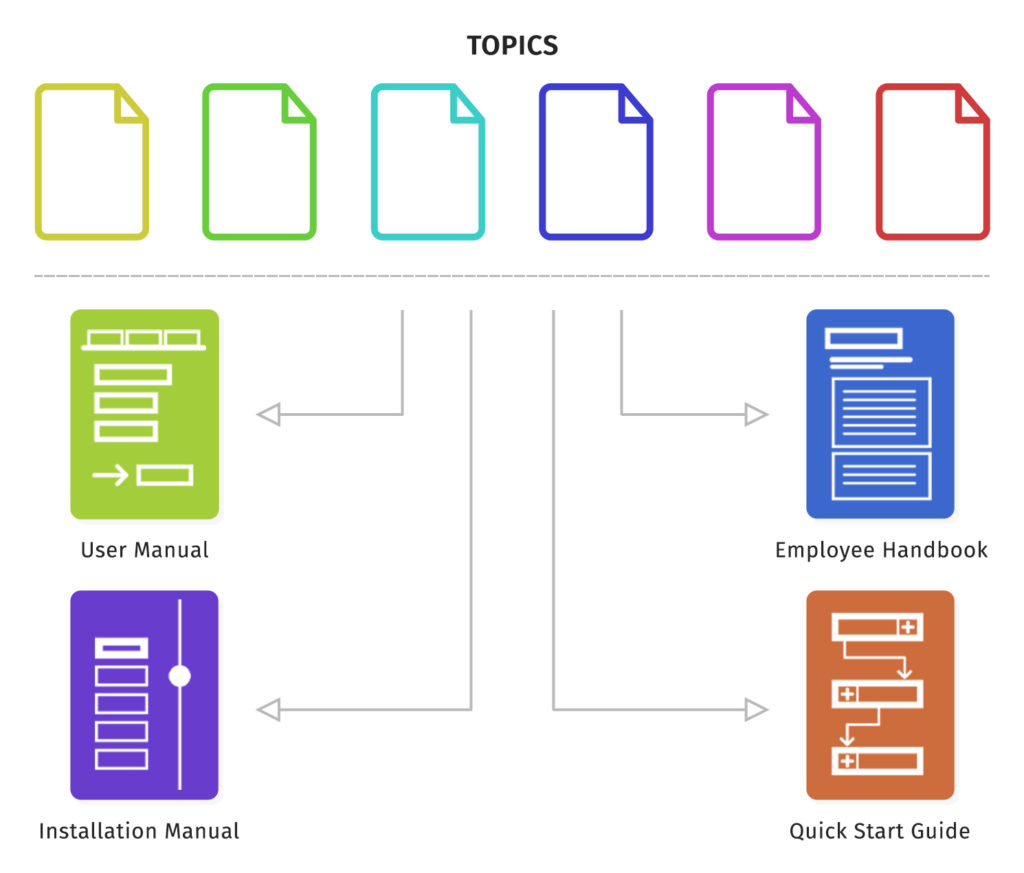
Single source authoring is a structured approach where you create and maintain content in a single set of source files, then reuse and publish that content into multiple outputs. In practice, it’s how you produce things like installation guides, administration guides, configuration docs, and user manuals without rewriting the same core information over and over.
The core idea is simple: updates happen once, and the change propagates everywhere that content is used. That’s why single source authoring is closely tied to multi-channel publishing and content reuse.
If you’ve ever shipped a doc update only to discover an older version still lives on a different site, a different PDF, or a different help system, you already understand the problem this solves.
Single sourcing is not primarily about writing faster. It’s about reducing duplication so you can keep accuracy and consistency as your content footprint grows.
The biggest benefit is content consistency. If “the one true step” lives in one place, you stop publishing mismatched instructions that confuse users and destroy trust.
Efficiency shows up next. You spend less time rewriting, less time reviewing duplicate sections, and less time doing emergency corrections when one version drifts from another.
Centralized control is the benefit that managers care about. It’s easier to govern content standards, access rights, and approvals when your source content lives in one system and publishes outward in controlled ways.
Single sourcing also helps translation and localization. When you reduce repetition and reuse common chunks, you generally translate less, manage terminology more consistently, and avoid paying for the same sentence to be processed multiple times in multiple documents.
Single source authoring shows up anywhere a team needs the same information in multiple formats, for multiple audiences, or across multiple product versions.
The classic use case is publishing a user manual to both online help (HTML) and print-ready output (PDF). You keep one set of source content, then generate both outputs so they stay aligned.
Another common use case is product variants. You might have one base product with multiple configurations, and you need separate documentation for each variant without maintaining separate documents for each.
It also shows up heavily in enterprise documentation sets like administration guides, installation guides, and configuration documentation. Those doc sets repeat patterns constantly, which makes them perfect for reuse.
If you write developer content, you’ll see the same need in API docs. You reuse definitions, authentication steps, error explanations, and code examples, then publish them across multiple guides. My workflow for that is in how to write API documentation.
Single sourcing fails when teams treat it like a vague concept instead of a set of concrete mechanisms. The features below are the ones that make reuse safe and scalable.
Variables are reusable pieces of text you define once and insert everywhere, like product names, version numbers, and feature labels. When the UI changes from “Workspace” to “Project,” you update the variable once and your outputs stay consistent.
I use variables for short, high-frequency content. If it’s a single word, a short phrase, or a small fragment that shows up everywhere, a variable is usually the cleanest option.
Snippets are reusable blocks of formatted content, like a warning, a prerequisite section, a standardized procedure, or a reusable table. You maintain the snippet once, then reuse it across topics, pages, and manuals.
In my experience, snippets are where single sourcing starts to feel powerful. They also introduce your first governance challenge, which is deciding what qualifies as reusable versus what should stay local.
Conditions let you include or exclude content based on output, audience, product, or platform. You can publish one version for internal staff, another for customers, and a third for a specific product tier, all from the same source.
This is also where teams get into trouble. If you add conditions without a strategy, you end up with content spaghetti where nobody can predict what the final output will look like.
Templates and styles are how you keep formatting consistent across outputs. Many workflows rely on CSS or style sheets so that layout and presentation stay standardized even when the content is reused across formats.
Media handling matters more than people expect. Single sourcing is not just text. You need a plan for screenshots, diagrams, and videos so you are not maintaining multiple asset libraries that drift.
Single source authoring can happen in more than one ecosystem. What matters is whether the toolchain supports structured reuse, multi-output publishing, and maintainable governance.
Some teams single source in “document-first” tools like Microsoft Word or Adobe FrameMaker. That can work, especially when the organization is already bought into those tools and needs incremental improvements without a full rebuild.
Other teams use help authoring tools and publishing systems designed for reuse, conditions, and output formats. You’ll see features like topic-based authoring, content references, variable sets, snippet libraries, and automated multi-channel publishing.
At a higher scale, organizations move toward structured content systems and component content management systems (CCMS). That’s where you get stronger reuse governance, access rights management, traceability, and collaboration workflows that feel closer to software development.
If you’re curious about structured systems, this is where approaches like DITA often enter the chat. My deep dive on Darwin Information Typing Architecture (DITA) explains how topic-based structured authoring ties directly into single sourcing.
If you want a broader view of the ecosystem, I keep an updated list of software documentation tools that covers authoring, management, and publishing options.
Single sourcing is a methodology, so principles matter. The strongest implementations I’ve seen follow a few simple rules consistently.
DRY means “Don’t Repeat Yourself,” but in documentation, it really means “reuse with intention.” If reuse introduces confusion, heavy dependencies, or weird conditional outputs, you just created a different kind of maintenance problem.
KISS means you keep the system understandable. Your future self should be able to open the project and predict what publishes where, without tribal knowledge.
Topic-based authoring works best when each topic can stand on its own. A topic should answer one question or support one user goal, so it can be reused without dragging extra context around.
This is one reason I’m picky about information architecture. If you want my process for structuring docs, it’s in the document development life cycle.
A reusable chunk should do one job. A warning snippet warns. A prerequisite snippet defines prerequisites. A task topic teaches one task.
When reusable content tries to do three jobs at once, it becomes hard to reuse safely, and it becomes harder to review because stakeholders argue about edge cases.
The best reuse strategy starts with identifying your reuse opportunity. What content repeats across deliverables? What changes by audience? What changes by product tier?
Then you build your reuse library around those realities, instead of randomly creating snippets because the tool makes it easy.
If you’re implementing single sourcing, the main goal is to avoid a giant “migration project” that never finishes. I prefer a phased approach where you start with a high-impact doc set and expand as the team gains confidence.
First, define the purpose and scope. Are you trying to publish to multiple output formats, reduce duplication, support translations, or all of the above? Your answer changes the tool and workflow decisions.
Second, design a content model. Decide what becomes a topic, what becomes a snippet, what becomes a variable, and what becomes conditional. This is also where a content strategy prevents over-engineering.
Third, align stakeholders early. If SMEs do not agree on terminology, or if product owners keep changing naming, single sourcing will not save you. It will just spread the inconsistency faster.
Fourth, make version control non-negotiable. Single sourcing multiplies the impact of changes, which means you need clear review workflows, traceability, and the ability to roll back. My guide on document version control covers the practical side.
Finally, train the team. Tools matter, but mindset matters more. People need to understand why reuse exists, how to request reusable components, and how to avoid breaking dependencies.
If you’re implementing this inside a knowledge base, structure and governance are half the battle. My Confluence best practices guide is a good example of how tool workflows and content governance collide in real teams.
Single sourcing is powerful, but it comes with failure modes that are very predictable. If you plan for them up front, you can avoid a lot of pain.
The first obstacle is cost. Not just tool cost, but migration time, training time, and the temporary slowdown that happens while people learn a new way of writing.
The second obstacle is content maintenance complexity. Reuse creates dependencies, and dependencies require discipline. If a writer updates a reusable snippet without understanding where it’s used, they can accidentally break multiple deliverables.
The third obstacle is content strategy confusion. Teams often start single sourcing without defining reuse boundaries, which leads to duplicate information creeping back in through “quick fixes,” followed by errors and inconsistencies across outputs.
The fourth obstacle is conditional publishing overload. Profiling is useful, but it can also create a system where nobody can predict the final output. That’s when teams start exporting and manually patching outputs, which defeats the whole point.
The fifth obstacle is translation workflow mismatch. Single sourcing can simplify translation projects, but only if your localization teams and tools can consume the structure cleanly. Otherwise you end up with workarounds that reintroduce duplication and manual effort.
If you’re dealing with SME coordination challenges during implementation, it helps to tighten your review process. My guide on working with subject matter experts covers the workflow I use to keep reviews fast and accurate.
Here’s my simple test. If you publish one doc to one audience in one format, single sourcing is usually overkill.
If you publish to multiple formats, multiple audiences, multiple product versions, or multiple languages, single sourcing starts to pay for itself fast. The bigger and more repetitive your content set gets, the more valuable centralized control becomes.
If your team is considering structured authoring, it helps to understand the underlying markup foundations too. Many structured workflows rely on XML-based standards, and if you want the canonical reference, the W3C maintains the XML specification here: Extensible Markup Language (XML) 1.0.
Single source authoring is not a silver bullet. It’s a trade: you accept more planning and structure up front so that maintenance gets dramatically easier later.
When it’s implemented well, it also changes the culture around documentation. Docs stop being “a bunch of files” and start becoming a system your team can trust.
Check out our Technical Writing Certification Course to learn more about becoming a successful technical writer.

Single source authoring is a powerful methodology for managing and scaling documentation efficiently. By centralizing content, reducing duplication, and leveraging tools like variables, snippets, and conditions, teams can create consistent, accurate outputs across multiple formats and audiences.
However, success with single sourcing depends on planning. A clear content strategy, well-defined reuse practices, and strong governance are essential to avoid common pitfalls like over-complicated conditions or maintenance issues. Start small, focus on high-impact use cases, and expand as your team builds confidence with the system. When done right, single source authoring transforms documentation into a reliable, scalable resource for your organization.
Here I answer the most frequently asked questions about single source authoring.
Single source authoring is a methodology where content is created and maintained in one source, then reused and published across multiple deliverables. The practical goal is to reduce duplication and keep outputs consistent.
When a change happens, you update the source once and the published outputs update everywhere that content is used.
Multi-channel publishing is the output side, meaning generating PDF, HTML, help systems, and other formats. Single source authoring is the content management side, meaning maintaining one reusable source set that feeds those outputs.
Most mature workflows use both together, because multi-channel publishing without reuse still leaves you maintaining duplicates.
Look for variables, reusable snippets, conditional publishing, template and style control, and strong media handling. If your content is large, add versioning support and collaboration controls to the list.
If you plan to translate, you also want a workflow that supports stable structure and consistent terminology.
The most common challenges are up-front cost, training, and governance. Teams also struggle with poorly planned reuse, especially when conditional publishing gets too complex.
Single sourcing works best when you treat it as a content strategy and process change, not just a tool installation.
Adopt it when you have multiple output formats, multiple audiences, multiple product versions, or frequent updates that create duplication. The bigger and more repetitive your doc set is, the better single sourcing tends to perform.
If you have a small doc set with minimal repetition, simpler workflows often win.
Start with one doc set that has obvious repetition, like installation docs or a knowledge base section that keeps drifting. Define a simple reuse strategy, build a small library of variables and snippets, and publish to two outputs first.
Once the team trusts the system, expand to more deliverables and more sophisticated conditions, instead of trying to do everything at once.
Get the weekly newsletter keeping 23,000+ technical writers in the loop.
Learn technical writing and advance your career.
Please check your email for a confirmation message shortly.





















Get our #1 industry rated weekly technical writing reads newsletter.
Your syllabus has been sent to your email