Our reviewers evaluate career opinion pieces independently. Learn how we stay transparent, our methodology, and tell us about anything we missed.

Our reviewers evaluate career opinion pieces independently. Learn how we stay transparent, our methodology, and tell us about anything we missed.
The first time I saw a document control process fail was in a normal week when two teams shipped work based on two different “approved” procedures. We had a hard time figuring out which one was in effect, and it was straight up annoying to waste time on that when there were more important things to do.
When it’s well-designed, it prevents confusion, rework, and compliance stress; when it’s poorly designed, it turns every update into a guessing game.
So, based on my professional experience, in this article, I’ll explain what the document control process is.
When I talk about a document control process, I’m talking about the system I rely on to keep documentation from spiraling out of control. It’s how documents get created, reviewed, approved, published, distributed, updated, and retired without anyone guessing which version is “the real one.”
The goal is simple: the right people can find the right document when they need it, and if someone asks later what happened, you can prove it. This is the same idea described in Gartner’s information technology glossary as a way to reduce operational and compliance risk through controlled processes.
If you want the zoomed-out, textbook definition first, start with what Is document control This article is the more practical follow-up, the “here’s how I run it so people follow the rules” companion.
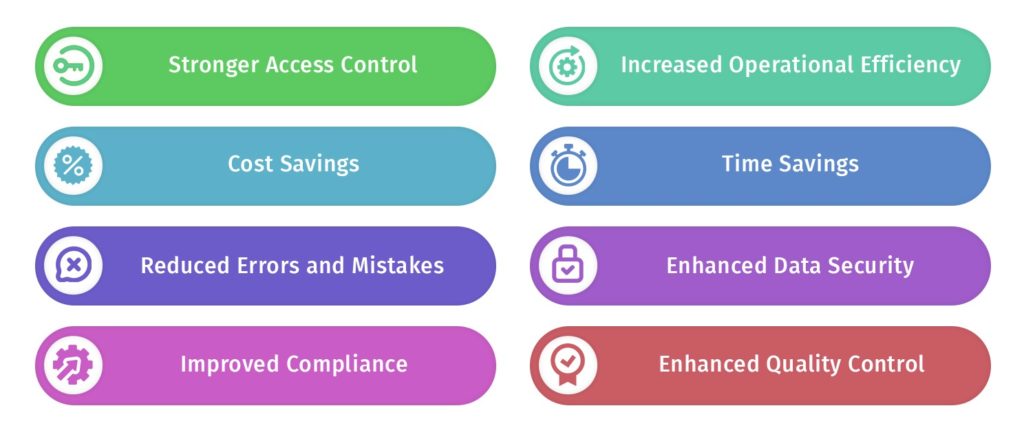
The most immediate benefit is operational clarity. People stop guessing which version is current because your process makes “current” a status, not a rumor.
The second benefit is traceability you can defend. When a safety incident, customer complaint, or audit question comes up, you can answer with evidence: the effective version on a specific date, the approval record, and the revision reason that explains why it changed.
The third benefit is speed that does not feel reckless. A good workflow removes decision fatigue for authors and reviewers, which reduces approval ping-pong and makes updates routine instead of disruptive.
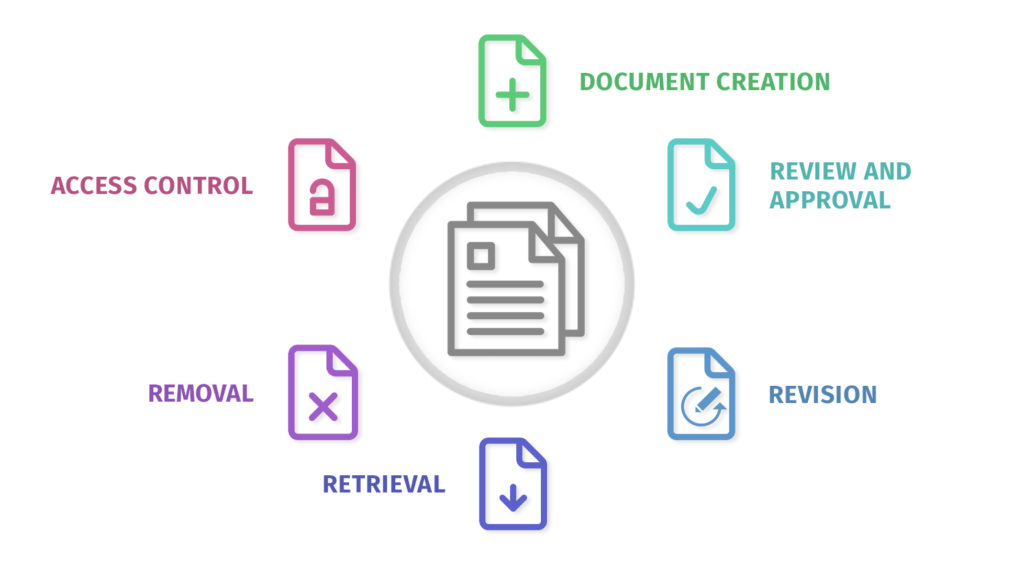
Most document control processes follow the same backbone, even if the toolset changes. I like to think of it as a lifecycle with checkpoints, where each checkpoint answers one question: “is this safe to move forward?”
Here’s the workflow I implement.
Intake is where you decide whether something is controlled, who owns it, and what standard it must follow. I start by classifying the document type because type usually determines workflow, training requirements, and review cadence.
Identification is not just naming the file. I assign a unique document ID and set the baseline metadata at creation time so it is not “optional later.” At minimum, I capture owner, department, document type, status, version, effective date, and review interval, because those fields drive search, routing, and audit traceability.
I also define the scope of control upfront. For example, if a doc is controlled, I enforce that the document ID appears in the header or footer, and that the repository entry is the source of truth even if the content is exported as a PDF.
If you want a practical system for IDs, here’s my article on document control numbering.
Templates are the fastest way to make document control feel lighter because they eliminate missing fields and reduce reviewer friction. A good controlled template includes the document ID, title, owner, status, version, effective date, and a revision history block, and it places them consistently so reviewers can verify them quickly.
I also standardize structural elements that affect maintenance. That includes a clear purpose statement, scope, definitions, responsibilities, and the procedure or process content, because those sections are where future updates usually happen and where ambiguity tends to creep in.
If you work in a regulated environment, I treat “drafting” as creating a controlled draft record, not just writing. That means the draft must have an assigned owner, a review group, and a defined target effective date so it does not sit in limbo.
This is where informal systems collapse, so I make reviewer roles explicit. I separate accuracy review, compliance or quality review, and final approval because each group is checking a different kind of risk.
Accuracy reviewers validate technical correctness and usability. Compliance reviewers validate alignment to standards, required fields, and governance rules. Approvers are decision-makers who accept the risk of release and confirm the doc is fit for use.
I also define what “approval” means in practice. Approval must be recorded in a system log or signature record with approver identity, date, and version, and it must be tied to the controlled document ID so you can prove exactly what was approved.
Version control is the mechanism that keeps “current” from becoming a debate. I keep the document ID stable and increment the version, then I ensure the repository shows one effective version and a visible history of prior versions.
Revision history is not just a list of dates. Every revision should include a reason for change and a summary of what changed at a level a reviewer can validate quickly, such as “updated acceptance criteria,” “changed process owner,” or “replaced step sequence to match new tooling.”
I also define how revisions are triggered and categorized. Minor updates might follow a lighter review path, while major changes that affect safety, regulatory compliance, or training require full review and a new effective date.
If versioning is a recurring pain point, read my article on document version control.
Publishing is the moment the document becomes authoritative. I treat publishing as creating an immutable effective copy, locking key fields, and setting the effective date so there is no ambiguity about when the new version takes effect.
Distribution is not emailing attachments. Distribution is making the repository entry the official access point and controlling what happens when people download or export. If offline copies are necessary, I label them clearly, time-box them where possible, and ensure the repository remains the reference during disputes.
This is also where I validate permissions. Most chaos happens when too many people can edit published docs or when “approved” files can be overwritten without creating a new version record.
Documents do not stay correct on their own, so maintenance has to be scheduled and enforced. I set review intervals based on risk and volatility, then I track review due dates the same way I track approvals, because overdue reviews are one of the easiest audit findings to prevent.
Change management is the control layer that prevents random edits. A change should start with a request that states what is changing and why, and it should end with an approval record tied to the new version and effective date.
I also make it easy to do the right thing by defining a change threshold. If the change affects steps people follow, acceptance criteria, safety controls, or compliance language, it is not a “quick edit.” It is a controlled revision with traceable review.
Obsolete does not mean deleted. I archive obsolete documents so they cannot be used operationally, but they remain available for audit evidence and incident investigation.
I define retention rules by document type and risk. Policies and SOPs often have longer retention because they are referenced in compliance and training history, while drafts might have shorter retention if they are not part of the official record.
I also enforce visible status labeling. A document that is obsolete should be marked as such in the repository and in the file itself, so a downloaded copy cannot be mistaken for the current version.
If you like lifecycle thinking, this pairs well with document lifecycle management.
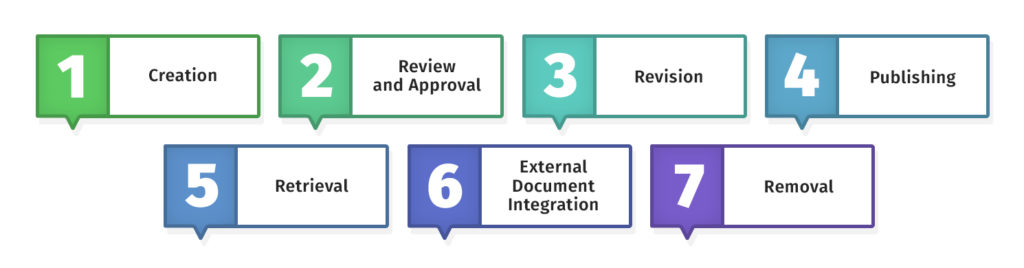
In my experience, this trio is what prevents document control from falling apart. It’s the safeguard against the most common mistake: someone grabs the wrong version, and the problem only surfaces after the consequences appear.
Identification answers “what is this document?” Version control answers “which one is current?” Change management answers “how do we update it without chaos?” When these three are solid, everything else becomes easier to enforce.
A practical tip that works everywhere is requiring a revision reason for every change. It keeps people honest and makes audit trails meaningful rather than just a list of timestamps.
This is the part that turns “we have a process” into “we have a process people can’t bypass.” I manage this using the principle of least privilege, which means people get only the access they need to do their job.
Here’s how I define access levels:
You’ll want role-based access permissions rather than individual-by-individual permissions, because they scale better and are easier to audit. If your tool supports it, activity logging and tracking are also huge, since they give you visibility without relying on memory.
For distribution, I like a simple rule: the source of truth is the repository link, not an emailed attachment. If people need offline access, that’s fine, but it should be controlled, time-boxed, and labeled.
Organization is where document control either becomes frictionless or painful. A well-structured repository makes retrieval easier, reducing the temptation to keep “personal copies” and shadow folders.
I combine a few lightweight approaches:
You don’t need a complex taxonomy to start. You just need consistency, because consistency is what makes search and access controls useful.
If you want a broader system view, read about document management.
I’ll keep this focused on the factors that prevent the most common breakdowns.
Pick one repository for controlled documents and treat it as authoritative. If more than one location is considered “official,” users will default to whatever is fastest, not whatever is correct.
I also make the source of truth easy to share. If people can copy a link to the controlled record, they stop emailing attachments, which reduces the number of stale copies in circulation.
Role-based access reduces risk and reduces administrative overhead. It also improves audit readiness because you can explain permissions as a policy rather than a pile of exceptions.
I keep published documents protected by default. If someone can overwrite an effective document without creating a new version record, your system is not controlled, even if it looks organized.
Templates prevent missing fields, and required metadata improves retrieval and routing. Together, they reduce review time because reviewers can validate control fields without hunting.
I also define required metadata as part of the workflow, not as a suggestion. If a doc cannot move from draft to review without an owner and doc type, it forces discipline in a way that training alone rarely accomplishes.
The best audit trail is created automatically as part of normal work. Every approval, publish event, and status change should be captured by the system log and tied to the document ID and version.
If your audit trail depends on someone updating a spreadsheet after every change, it will drift out of sync. I treat manual logging as a temporary bridge, not a permanent design.
Tools can enforce review cycles, approval routing, version control, and logging, but they cannot compensate for a workflow that is undefined. I always define the process first, then configure the tool to match the process.
When software and process disagree, people route around the tool. That is why I keep the workflow simple enough that the tool feels like a shortcut, not a tax.
Most teams underinvest here, which is why document control becomes a rule people work around. If the process feels worse than the shortcut, it won’t stick.
I focus on two things: showing people how to use the system and explaining why it matters. Then I keep it alive with light reminders around reviews and change requests, so it doesn’t fade the moment rollout is over.
Here are some of the top technical writing courses you can check out to strengthen your writing and documentation skills.
If you can’t measure the process, you can’t improve it. Metrics also help you catch problems before they become the norm, like reviewers who always delay approvals or teams that keep working from downloaded PDFs.
Here are a few metrics I like because they’re simple and actionable:
When something looks off, I use root cause analysis to avoid “patch fixes.” If approvals are slow, the problem might be unclear ownership, too many approvers, or a workflow step that doesn’t match reality.
A document control process can feel overwhelming as your organization grows, documents multiply, and little inconsistencies sneak in everywhere. I’ve been there, watching teams struggle to figure out which version is current or hunting through folders for a number that doesn’t make sense.
But when I build the process around clear document IDs, reliable version control, structured approvals, and sensible access permissions, the benefits show up immediately. From there, I rely on metrics, regular training, and software to keep things running.
The system enforces the workflow, and I don’t have to.
Here I answer the most frequently asked questions about the document control process.
Document management systems are a broader category that includes storing, organizing, and retrieving documents. Document control is the discipline that adds structured rules around versions, approvals, access, distribution, and traceability.
In larger or regulated organizations, ownership often lives with QA or a document control coordinator. In smaller teams, ownership might sit with operations or a technical writer who becomes the “documentation systems” person.
Most bottlenecks come from unclear responsibilities or too many approvers. I fix it by defining reviewer roles, limiting approvals to true decision-makers, and using automated routing and reminders when the workflow is stable.
Make the repository link the official distribution method, lock down published versions, and use clear version control with revision history. If your tool supports read-only publishing and access logging, those two features help more than people expect.
Get the weekly newsletter keeping 23,000+ technical writers in the loop.
Learn documentation engineering and advance your career.
Please check your email for a confirmation message shortly.





















Get our #1 industry rated weekly technical writing reads newsletter.
Your syllabus has been sent to your email