Our reviewers evaluate career opinion pieces independently. Learn how we stay transparent, our methodology, and tell us about anything we missed.

Our reviewers evaluate career opinion pieces independently. Learn how we stay transparent, our methodology, and tell us about anything we missed.
The first time I documented an API, I thought I was ready because I could read the endpoints and run a few requests. Then I watched a developer hit three auth errors in a row, close the tab, and message support instead.
That’s when it clicked for me: API documentation is a product onboarding flow, just in text form. If the docs don’t reduce uncertainty fast, your API adoption slows down and your support tickets spike.
These steps cover the “getting started” experience, the reference topics developers live in, and the maintenance workflow that keeps docs from rotting. I’m writing this from the perspective of a technical writer who works with API developers and stakeholders, not as someone guessing from the outside.
If you’re curious what the role looks like end-to-end, I break it down in what an API technical writer does. If you want tooling ideas after you finish the writing, I also keep a running list in API documentation software tools.
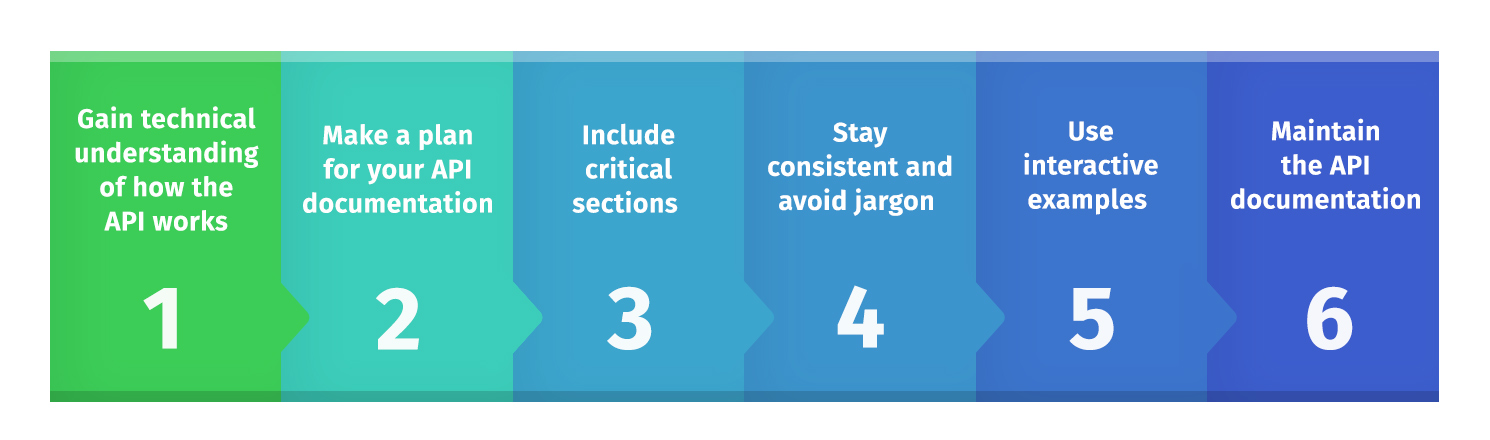
Before I write a single sentence, I try to use the API like a real consumer. I set up a testing environment (or sandbox), authenticate, and run requests until I can predict what the API will do.
If the team has an OpenAPI specification, I treat it like the source of truth for endpoints, parameters, and status and error codes. If the spec doesn’t exist yet, I push for a spec-first or API-first strategy because it makes the docs and the API evolve together instead of drifting apart.
When I’m getting started, I ask for three things: the OpenAPI document, a working API key (or test credentials), and a few realistic use cases the business cares about. That combo tells me what matters, what’s stable, and what’s still changing.
API documentation has multiple audiences, and pretending it doesn’t is how you end up with vague docs that satisfy nobody. I typically write for at least two groups: first-time integrators who need confidence, and experienced API consumers who want answers fast.
This is also where I align with stakeholders on outcomes. Are we optimizing for onboarding speed, fewer support tickets, higher API adoption, or all three?
When the audience is mixed, I keep the page structure predictable. Tutorials and “getting started” guides teach the workflow, while reference documentation exists to answer precise questions in seconds.
I outline the docs before I fill anything in, because structure is half the UX. When the structure is clean, developers can skim and still find what they need.
Here’s the minimal set of components I almost always include:
I keep a lightweight terminology list too, because consistency is a hidden superpower in API docs. If you want an easy way to formalize that, these technical writer style guide examples translate surprisingly well to API documentation teams.
According to SmartBear, the following are among the most important sections of API documentation.
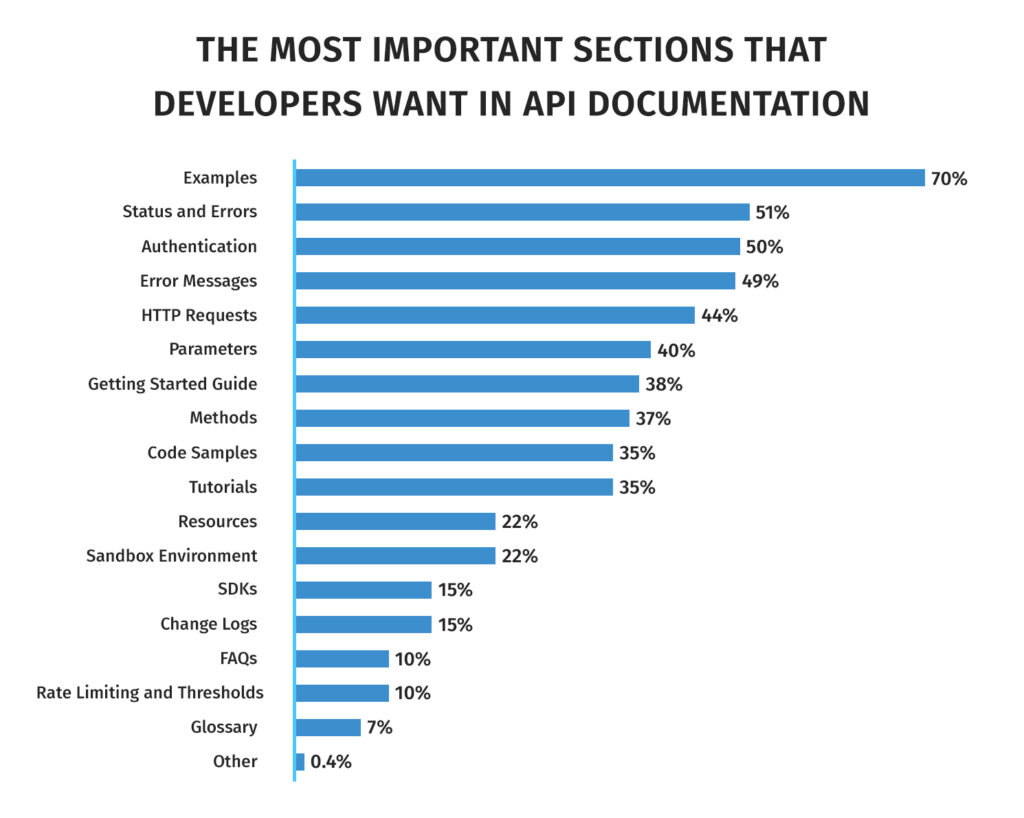
Reference documentation is where developers spend most of their time, so I’m ruthless about clarity here. Each endpoint page should answer the same questions in the same order, every time.
I try to make each reference topic feel “complete” without being wordy. That usually means: a short description, the endpoint and method, parameters (with types and constraints), example requests, example responses, and edge cases that will actually happen in production.
When I add code samples, I prioritize the formats developers can copy immediately. A curl example plus a clean JSON response goes a long way.
curl -X GET “https://api.example.com/v1/widgets?limit=10” \ -H “Authorization: Bearer YOUR_TOKEN”
{ “data”: [ { “id”: “w_123”, “name”: “Widget A” } ], “next_cursor”: “abc123” }
I also make error handling painfully obvious. If a 401 can mean “missing token” and “expired token,” I spell out both, because that’s where integration time disappears.
Great API docs don’t just describe endpoints; they show how to accomplish something meaningful. This is where guides and tutorials earn their keep, especially for multi-step workflows like OAuth, webhooks, or “create then verify then fetch.”
I write tutorials around the most common integration paths. If your API is a payments API, the tutorial shouldn’t be “list customers,” it should be “take a payment end-to-end,” because that’s the real job.
When I need inspiration for formatting, I study documentation hubs that have nailed developer experience. Stripe’s API docs are famous for clarity and examples, Twilio’s docs are strong at guiding workflows, and Shopify’s docs do a solid job of balancing reference and learning content.
If your team can support it, interactive documentation helps too. A “try it” console (even a basic one) turns passive reading into hands-on confirmation, speeding up onboarding and reducing guesswork.
Shipping API docs is the easy part. Keeping them correct after the next release is where teams usually fall apart.
I like a docs-as-code approach when possible because it provides version control, reviews, and a repeatable release process. Even if you don’t go full docs-as-code, you still need a review process that includes the API developers and a clear owner for documentation quality.
Here’s the maintenance loop I rely on:
Tools can help a lot here, especially if you’re generating reference documentation from an OpenAPI specification. I’ve used (or worked alongside teams using) tools like Postman, Swagger UI, SwaggerHub, Stoplight, Redocly, and DapperDox, depending on whether the team needs a documentation generator, a documentation hub, or a full platform workflow.
If you want the broader “docs stay healthy” mindset, I also wrote a guide on good documentation practices. It’s not API-specific, but the maintenance principles carry over.
If you remember nothing else, remember this: API documentation is how your API scales without your team becoming a human help desk. The best docs make the integration feel obvious, and the best maintenance process keeps that feeling true six months later.
Using an API documentation tool can provide many benefits. Tools help reduce the time it takes developers and technical writers to write and maintain API documentation by automating or simplifying some tasks.
Some of the features that API documentation tools support include automatic updates to documentation based on changes to source code, version control, collaboration, and customization options.
Here are some tools used for writing API docs.
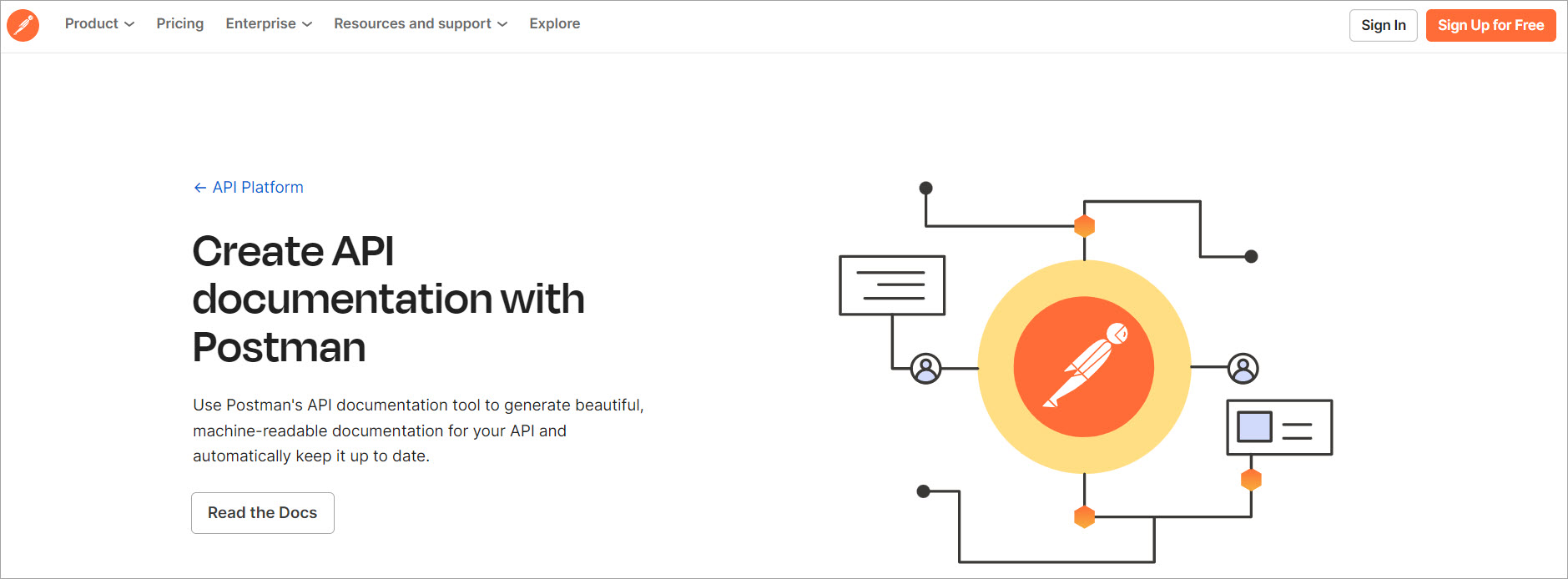
Postman is an API platform that enables developers to design, build, test, and iterate on their APIs.
You can use Postman’s API documentation tool to generate machine-readable documentation for your API and keep it up to date.
Postman pulls sample requests, headers, code snippets, and more to populate the documentation with dynamic examples and machine-readable instructions. It also updates documentation when you make changes to your collection.

SwaggerHub is an integrated API design and documentation platform built for teams to drive consistency and discipline across the API development workflow.
Supported features include smart error feedback and syntax auto-completion, embedded API design rules that enforce standards in real time, and real-time commenting and issue tracking.

Redocly is an open-source tool that generates API documentation from OpenAPI specifications.
It supports version control, collaboration, user roles, try-it authentication, and other security features. A unique feature is preview functionality: you can preview every branch or pull request to ensure your changes are reviewed and discussed before pushing to production.
When I’m stuck on how to document an API cleanly, I don’t “reinvent documentation.” I go study a few documentation hubs that consistently help developers ship integrations without hand-holding.
The goal isn’t to copy someone’s style. The goal is to steal their structure—especially how they organize API reference topics, code samples, error handling, and workflows.
Stripe’s docs are a masterclass in making the API reference feel usable, not academic. The page layout makes it painfully easy to find an endpoint, copy a request, and understand the response without reading a novel.
What I take from Stripe is the “show, then explain” rhythm: strong example requests and responses upfront, followed by the details developers need when something breaks.
Twilio is good at guiding developers through a complete workflow, not just listing endpoints. Their tutorials tend to feel like “do this, then this, then this,” which matches how integrations actually happen.
What I copy is the way they chunk steps into small wins, with enough context to prevent confusion but not so much text that the user gets lost.
Shopify does a solid job of helping developers understand what they should build, not just what they can call. The docs usually connect endpoints to real use cases and product concepts, which reduces misimplementation.
What I borrow is their consistency: predictable reference formatting, clear concepts, and a strong separation between guides/tutorials vs reference documentation.
GitHub’s API docs are a great reminder that “auth” is rarely just one step. Permissions, scopes, and failure modes are where developers lose time, so GitHub tends to surface those details clearly.
What I take from GitHub is the emphasis on explaining what success looks like and what common errors mean in plain language.
Slack shines when documentation has to explain systems that react to events, like webhooks and event subscriptions. They tend to describe the workflow, then give concrete payload examples, then explain how to verify your integration.
What I copy is their use of realistic example payloads and “how to test it” guidance, because that’s what makes hands-on activities possible.
Open source API projects often have docs written by people who live in the codebase, so you’ll see very practical details. They’re also good places to study how documentation evolves as endpoints change and contributors add features. I’ll use Kubernetes as an example.
If your API is public-facing, studying open source docs helps you spot gaps in “getting started” and “integration workflow” guidance, because the audience is broad and unforgiving.
The best docs make the “happy path” obvious, then help you recover when reality hits. They consistently include an example request, an example response, and a short explanation of what matters in the response (not a full data dump).
They also treat error handling like first-class content, not an appendix, because that’s where developers spend real time.
If you want your docs to feel like the best documentation hubs, make sure every major integration path has a guide or tutorial that ends in a clear success state. Then reinforce that guide with reference topics that follow the same predictable format every time.
If a developer can’t tell what to do in under a minute, the docs are too slow. If they can’t copy/paste a working request in under two minutes, the docs are too abstract.
And if they hit an error and your docs don’t tell them what it means and what to do next, your support team is going to feel it.
Here I answer the most frequently asked questions about API documentation.
API documentation explains how to use an API, including endpoints, authentication, parameters, and responses. It’s important because it drives API adoption and reduces support overhead by removing guesswork.
Most API docs need an overview, authentication instructions, endpoint reference topics, request/response examples, and status/error codes. Mature docs also include rate-limiting details and release notes for changes over time.
Start by using the API yourself in a sandbox or test environment. Then identify your audience and outline the docs structure before you write the endpoint-by-endpoint reference.
Write for scanning, keep examples copy-pastable, and avoid assumptions about what the reader already knows. Most importantly, build a workflow that updates docs whenever the API changes.
Separate tutorials (learning and workflows) from reference docs (fast answers). Then keep the structure consistent so beginners don’t feel lost and experienced developers don’t feel slowed down.
Any time the API behavior changes, the docs should change with it. If you can’t update docs per release, schedule regular reviews so outdated instructions don’t linger and break integrations.
Get the weekly newsletter keeping 23,000+ technical writers in the loop.
Learn documentation engineering and advance your career.
Please check your email for a confirmation message shortly.





















Get our #1 industry rated weekly technical writing reads newsletter.
Your syllabus has been sent to your email