Our reviewers evaluate career opinion pieces independently. Learn how we stay transparent, our methodology, and tell us about anything we missed.

Our reviewers evaluate career opinion pieces independently. Learn how we stay transparent, our methodology, and tell us about anything we missed.
The first time I realized product documentation could make or break adoption, I was working on a product where support tickets kept piling up even though the feature “worked.” Users were not failing because they were careless, they were failing because the docs assumed too much and explained too little at the exact moment they needed clarity. Since then, I have treated product documentation like part of the product itself, because that is how users experience it.
Product documentation is any documentation that explains how a product works and how to use it successfully. That includes user-facing help content like setup guides and troubleshooting, plus internal artifacts like requirements documents and technical specs that support building and maintaining the product.
When it’s done well, product documentation becomes part of the product experience. It reduces confusion, increases confidence, and helps users move forward without needing a human to rescue them.
When I write product documentation, I always start by identifying who is using it and what they are trying to accomplish. A single product docs site can serve multiple audiences, but each audience reads with a different goal in mind.
External users want outcomes, not explanations. They want to install, configure, complete a workflow, or fix a problem fast, and they want the docs to match what they see in the product.
This group benefits most from clear navigation, predictable structure, and practical artifacts like quick start guides, tutorials, user manuals, and self-serve troubleshooting content.
Developers use documentation differently than end users. They care about precision, examples, edge cases, and the ability to copy a working snippet without guessing.
That is why API docs, SDK guides, and integration tutorials need strong information structuring and consistent versioning. If you want a solid external reference for what good developer docs look like, I often use Google’s developer documentation style guide as a shared baseline during reviews.
Support teams use product documentation as a force multiplier. They rely on it to answer repeat questions quickly, share links, train new agents, and keep responses consistent across shifts.
This is where a well-maintained help center or knowledge base pays for itself. If you are building that system, my guide to knowledge base documentation is a useful companion.
Internal teams rely on product documentation even if they do not call it that. Product managers use docs to align on product strategy, scope, and release readiness, while UX writers use it to keep in-product language and documentation consistent.
Engineering and QA lean on system documentation, architecture diagrams, test documentation, and technical specs to keep implementations stable. When internal docs are missing, teams invent local versions of truth, and coordination becomes painful.
SMEs are essential because they carry the real product knowledge, including edge cases and the “why” behind decisions. Technical writers turn that knowledge into usable content with structure, clarity, and consistency.
If you are building an internal process for reviewing and publishing, it helps to treat docs like a cross-functional workflow, not a writer-only task.
Product documentation supports users and it supports the business, and those outcomes compound over time. When documentation is easy to find and easy to trust, customers complete tasks faster and rely less on support.
Documentation also strengthens the value proposition because it reduces friction between purchase and success. It improves onboarding, helps teams ship cleaner release notes, and makes it easier to communicate changes without breaking user workflows.
Internally, product documentation creates a single source of truth that supports cross-functional coordination. When requirements, product strategy, and versioning practices are documented clearly, teams argue less about what is true and spend more time shipping.
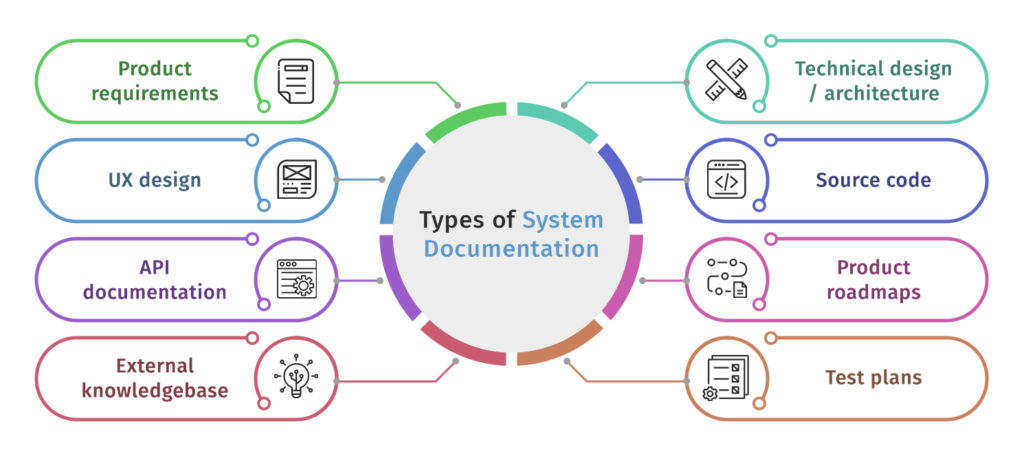
I group product documentation into four big categories. Most products need some mix of all four, even if the team does not label them this way.
This is the help content your customers and end users rely on. It includes quick start guides, user manuals, tutorials, knowledge base articles, troubleshooting pages, and FAQs.
User-facing docs succeed when they are task-oriented and scannable. If users cannot find the right answer quickly, they do not read harder, they leave.
This includes API docs, SDK guides, READMEs, integration guides, and developer portals. These docs live and die on accuracy, examples, and versioning.
A helpful external framework for organizing technical docs is Diátaxis, because it forces you to separate tutorials, how-to guides, references, and explanations instead of mixing everything together.
System documentation explains how the product is built and how it behaves. This is where you see system architecture diagrams, technical architecture descriptions, service dependencies, and operational runbooks.
These docs matter most when products scale, teams grow, and incidents happen. When system knowledge is undocumented, the cost shows up during outages and onboarding.
This category includes PRDs, MRDs, product roadmaps, product proposals, validation documentation, and technical specs. These artifacts support planning, approvals, and alignment across teams.
Even if users never see these docs, they influence what users experience. Clear internal documentation reduces rework and makes changes easier to communicate downstream.
A product documentation set is usually made up of a few recurring components. The exact mix depends on the product, but these are the pieces I see most often.
User manuals and installation manuals support core usage and setup. Knowledge base articles and troubleshooting pages reduce support load and give users self-serve options for common issues.
Release notes, changelogs, and versioning artifacts help users understand what changed and whether they need to take action. For developer audiences, API docs and technical specs are critical, especially when the product changes frequently.
Internally, engineering docs, functional requirements, and system architecture diagrams help teams maintain product stability. A good product documentation strategy treats these artifacts as connected, not as separate silos.
When I create product documentation, I focus on a workflow that prioritizes the audience first, then structure, then writing. If you get the audience and structure right, the writing becomes easier and reviews become faster.
I start by defining who the doc is for and what success looks like for that reader. An end user trying to complete a workflow needs a different doc than a developer integrating an API.
This is also where I identify key stakeholders like product managers, support leads, SMEs, and UX writers. If you skip this step, you end up writing a doc that is “good” but not useful for anyone in particular.
Most documentation failures are findability failures. I use clear headings, predictable page types, and navigation that matches how users think, not how teams are organized internally.
If you want an external reference on building usable content structure, Nielsen Norman Group’s guidance on information architecture is useful when you need to align multiple stakeholders around why structure matters.
I keep paragraphs short and action-oriented, and I avoid burying steps inside long explanations. When concepts are necessary, I explain them in plain language and then bring the reader back to the task.
Visuals help when the UI matters, but I use them intentionally. A screenshot should clarify a step, not replace the step.
I use a simple workflow: draft, SME review for accuracy, editorial review for clarity and consistency, then publish with ownership. I keep reviews tight by asking SMEs to verify specific sections rather than “review everything.”
If your team is building a repeatable workflow, it helps to adopt templates and a writing checklist. Consistency is what makes large doc sets feel coherent.
Where you store product documentation depends on who needs it and how often it changes. User-facing documentation usually lives in a help center or knowledge base that prioritizes search and navigation.
Internal product documentation often lives in a product wiki or a tool like Confluence or Notion, especially when it supports planning and collaboration. For developer docs, some teams store content close to the source code so versioning aligns with releases.
Accessibility matters regardless of where the docs live. I want a centralized home that people can find, a structure that supports information retrieval, and permissions that match reality without blocking the people who need the content.
I choose tools based on the type of documentation and the workflow the team can realistically maintain. Some teams need a WYSIWYG editor for speed, while others prefer Markdown for consistency and version control.
Tools like Document360 are built for help centers and knowledge bases. They usually offer strong search, publishing workflows, and feedback modules, which makes them a good fit for customer-facing docs that need governance.
If you want a deeper look at how I think about knowledge base structure and ownership, start with my knowledge base documentation guide.
Confluence and Notion are common for internal product documentation because they support quick collaboration and lightweight publishing. The tradeoff is that structure can degrade over time unless you enforce templates and ownership.
For API docs and developer portals, API-centric platforms and source-controlled documentation workflows often work better. When the documentation lives close to code, it is easier to tie updates to releases, but you still need editorial standards to keep content readable.
Templates like MRD templates, product proposal templates, and a value proposition design canvas template help teams standardize how they think and communicate. The goal is not paperwork, it is alignment.
Keeping product documentation current is mostly a systems problem, not a writing problem. If updates are optional, documentation will always lag behind the product.
Every major doc set needs ownership. I prefer named owners for each doc area, plus a simple governance process for reviewing changes and resolving conflicts.
A content review checklist helps keep reviews consistent. It also makes it easier to onboard new writers or SMEs into the review workflow without reinventing expectations.
I like scheduled reviews for high-traffic docs and event-based updates tied to releases. When the product changes, the docs change, and that update should be part of the release workflow.
Release notes and changelogs help users understand what changed, but they are not a substitute for updating the underlying documentation. I treat release artifacts as pointers, while the core docs remain the source of truth.
Versioning should match how users experience the product. If you ship weekly, you need lightweight versioning and clear timestamps. If you ship major versions, you need versioned docs that let users select the correct release.
If you want to stay aware of what teams are doing with docs workflows and tooling, Write the Docs is a solid external community resource that stays practical and grounded.
Product documentation is not an accessory to the product. It is part of how users learn, troubleshoot, and trust what you shipped.
When you build documentation with a clear audience, strong structure, and a maintainable workflow, it becomes a real asset. It reduces support burden, improves onboarding, and creates alignment internally so teams can move faster with less confusion.
Here I answer the most frequently asked questions about product documentation.
Product documentation is any documentation that helps users and internal teams understand, use, support, and maintain a product. It includes user-facing help content and internal artifacts like requirements, specs, and system documentation.
Product documentation serves multiple audiences, including end users, developers, customer support teams, product managers, and internal teams like engineering and QA. The content and structure should change depending on what each audience is trying to accomplish.
Common examples include user manuals, quick start guides, knowledge base articles, troubleshooting pages, release notes, changelogs, API docs, SDK guides, technical specs, PRDs, and system architecture diagrams.
User-facing docs usually live in a help center or knowledge base with strong navigation and search. Internal docs often live in a product wiki or collaboration tool, and developer docs are sometimes stored close to source code so versioning aligns with releases.
Assign document ownership, define update protocols tied to releases, and run regular reviews for high-traffic content. The easiest approach is to make documentation updates part of the same workflow that ships product changes.
It depends on the audience and workflow. Knowledge base platforms work well for customer-facing docs, collaboration tools work well for internal docs, and API-centric or source-controlled workflows work well for developer documentation that changes frequently.
Get the weekly newsletter keeping 23,000+ technical writers in the loop.
Learn documentation engineering and advance your career.
Please check your email for a confirmation message shortly.





















Get our #1 industry rated weekly technical writing reads newsletter.
Your syllabus has been sent to your email