GUIDE 2026

How to Optimize a Knowledge Manager LinkedIn Profile

Are you struggling to make your Knowledge Manager LinkedIn profile stand out? You’ve come to the right place.

Founded in 2002, LinkedIn is the world’s largest professional network, connecting over 1.2 billion members across 200 countries. It empowers businesses and individuals to discover opportunities, grow their careers, and develop new skills.

The platform also enables users to share content, join groups, and engage in discussions. With tools to help businesses find talent and market their offerings, LinkedIn has become essential for professional growth. A staggering 72% of recruiters use LinkedIn regularly for talent acquisition, and over 35 million people have found jobs through the platform.

For Knowledge Managers, LinkedIn is not just a job board—it’s a powerful tool to showcase expertise, build a professional network, and position yourself as a leader in the field.

A Knowledge Manager is responsible for identifying, organizing, and making information accessible within an organization. Their primary goal is to ensure employees can quickly access the knowledge they need to work efficiently.

To achieve this, Knowledge Managers develop and implement information management systems, such as databases and document repositories. They also create training programs to help employees leverage available resources. Ultimately, their role is to maximize an organization’s collective knowledge for smoother operations and better results.

Whether you’re looking to expand your professional network or land your next role, optimizing your LinkedIn profile is essential. This guide will walk you through the steps to create a standout Knowledge Manager LinkedIn profile.

Steps to Optimize a Knowledge Manager LinkedIn Profile

A well-optimized LinkedIn profile increases your visibility and connects you with valuable opportunities. Whether you’re looking to expand your professional network or secure your next role, taking the time to craft a standout profile is essential.

Here are three foundational steps:

  • Use a clear, professional profile photo.
  • Complete every section of your profile, including work history, education, and skills.
  • Stay active by sharing insightful articles, engaging with relevant groups, and commenting thoughtfully on industry posts.

Your LinkedIn profile is not just a digital resume—it’s a powerful tool for building your personal brand and achieving your career goals. With new features rolling out regularly, LinkedIn helps professionals get the visibility they deserve. Best of all, optimizing your profile is entirely free. All it takes is a commitment to following the right steps and investing time in your professional growth.

Ready to elevate your LinkedIn presence? Let’s start with the first and most critical element: your profile photo.

Make a Strong First Impression With Your Profile Photo

Your profile photo is the first thing hiring managers notice, and it sets the tone for how they perceive you. A professional, well-chosen photo can encourage employers to take a closer look at your profile.

Even the most optimized profile can fall short if your photo doesn’t convey professionalism. Here’s how to make your profile photo work for you:

  • Use a Professional Headshot: A polished headshot conveys credibility and sets you apart. Ensure your photo highlights your head, neck, and shoulders. Avoid full-body shots, as they make it harder for employers to recognize your face.
  • Dress Professionally: Present yourself as an industry expert. Men should opt for a dress shirt, while women can wear a blouse, coat, or formal suit in solid, dark colors like black or navy. Steer clear of casual or striped clothing.
  • Choose a Recent Image: Credibility is key. Use a recent photo that reflects how you currently look to avoid confusing potential employers during interviews.
  • Keep It Simple: Avoid adding logos, text, or distracting backgrounds. Stand against a solid-colored, well-lit backdrop and wear a confident smile.
  • Be Consistent: Use the same photo across all professional platforms and your personal website. Consistency helps recruiters recognize you quickly.
  • Follow LinkedIn’s Guidelines: Ensure your headshot takes up at least 60% of the frame. Use a minimum resolution of 400 x 400 pixels and keep file sizes under 4 MB. LinkedIn supports GIF, JPEG, or PNG formats.
  • Get Feedback: Ask trusted colleagues for input or use online tools to evaluate your photo. Feedback can help you select the most professional and engaging option.

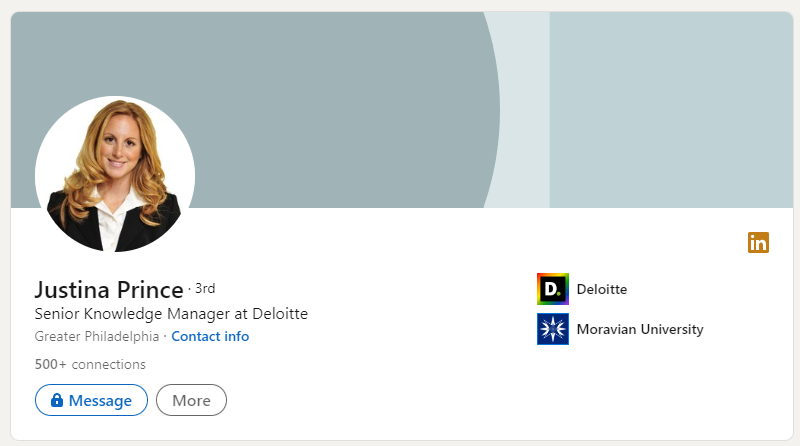
Here is an example of a strong and clear profile photo:
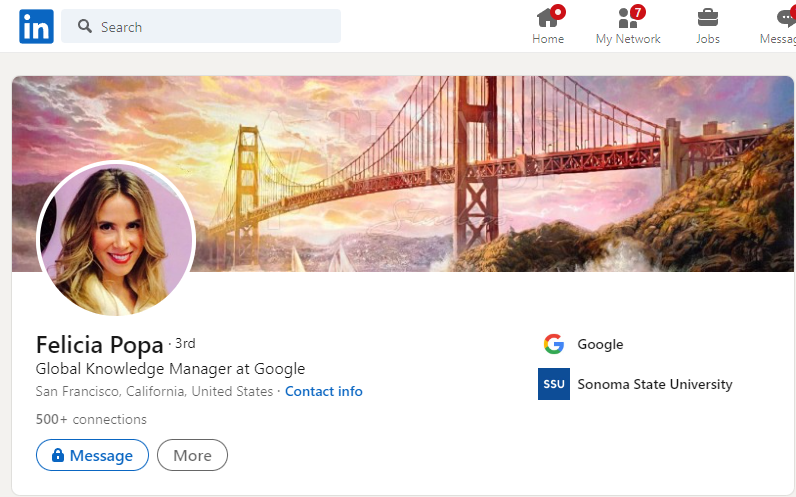
Knowledge Manager Profile Photo

Be Smart With Your Profile Headline

Your LinkedIn headline is one of the most important elements of your profile. It’s more than just a job title—it’s your opportunity to showcase who you are, what you do, and why you stand out. A strong headline can help recruiters and potential connections understand your expertise and encourage them to view your profile.

Your headline becomes a visible part of your LinkedIn identity, appearing in invites, messages, and search results. A compelling headline grabs attention, while an incomplete or vague one may turn people away.

When creating your headline, think about what makes you unique as a Knowledge Manager. Are you an expert in a specific area? Do you have a niche skill set or a proven track record? Use your 220-character limit wisely to communicate your value and attract the right opportunities.

Tips for Writing an Effective Headline

  • Use Keywords: Incorporate terms that describe your skills and expertise, such as “knowledge management,” “content organization,” or “process improvement.” This boosts your visibility in search results.
  • Keep It Concise: Your headline should be clear and no longer than 220 characters.
  • Be Action-Oriented: Use language that highlights what you do or deliver, like “Helping organizations streamline knowledge processes” or “Specialist in designing efficient content strategies.”
  • Highlight Niche Skills: Mention industry-specific skills to attract attention from employers or clients looking for your expertise. For example, “Knowledge Manager with expertise in digital collaboration tools.”
  • Stay Professional: Avoid jargon, emojis, or vague phrases like “enthusiast.” Instead, focus on clarity and professionalism.
  • Focus on Your Audience: Tailor your headline to resonate with potential employers or clients. For example, “Knowledge Manager with 4+ years of experience optimizing team workflows” is far more impactful than “Ninja Knowledge Manager Superstar.”

What to Avoid in Your Headline

  • Jargon: Keep your language simple and professional.
  • Unclear Titles: Avoid vague phrases like “Knowledge Manager Enthusiast.”
  • Emojis: They detract from your credibility.
  • Job-Seeking Phrases: Phrases like “Looking for new opportunities” can be off-putting to some employers. Instead, let your profile showcase your skills and experience naturally.

Example Headlines

Here are a few examples that reflect expertise, clarity, and professionalism:

  • “Knowledge Manager | Expert in Knowledge Systems and Process Optimization”
  • “Helping Teams Organize and Access Knowledge for Better Decision-Making”
  • “Experienced Knowledge Manager | 4+ Years in Content Strategy and Information Architecture”

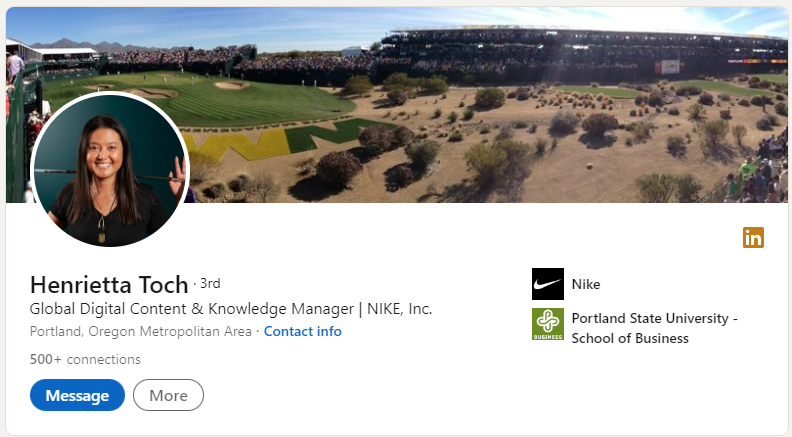
An example of a good headline is as follows:

Great example knowledge manager

Credit: Henrietta Toch

Make Getting in Touch With You Easier

With hundreds of profiles sharing similar skills, it’s crucial to make yours easy to find and connect with. One simple but effective way to stand out is by customizing your LinkedIn profile URL. A personalized URL, such as including your name and profession, strengthens your branding and makes it easier for recruiters to locate you.

Customizing your URL isn’t just about convenience—it’s part of building your professional identity and increasing your visibility on LinkedIn. Follow LinkedIn’s tutorial for step-by-step instructions.

In addition to customizing your URL, make it simple for recruiters and clients to contact you. Use the “Contact Info” section to include key details like your email, links to your portfolio, and even your personal website. This is also an excellent place to upload an updated resume or showcase your work.

Steps to Add Contact Information and Portfolio Links

Here’s how you can update your contact details:

  1. Click the edit icon on the top-right of your profile.
  2. Scroll to the bottom and click Add website under the “Website” section.
  3. Paste the link to your portfolio in the first field, and add a description for the link in the text field.

You can also include:

  • Your email address.
  • Contact number.
  • Social media profiles.
  • Any other relevant links that showcase your work.

Adding these details is optional, so choose what feels appropriate for your professional goals.

Why This Matters for Knowledge Managers

For Knowledge Managers, direct access to your portfolio, case studies, or achievements can make a lasting impression on recruiters. Use this section to highlight how you’ve successfully organized and streamlined knowledge processes, implemented systems, or enhanced collaboration across teams.

A clean, customized profile URL and well-placed contact information set the stage for meaningful connections with hiring managers and clients.

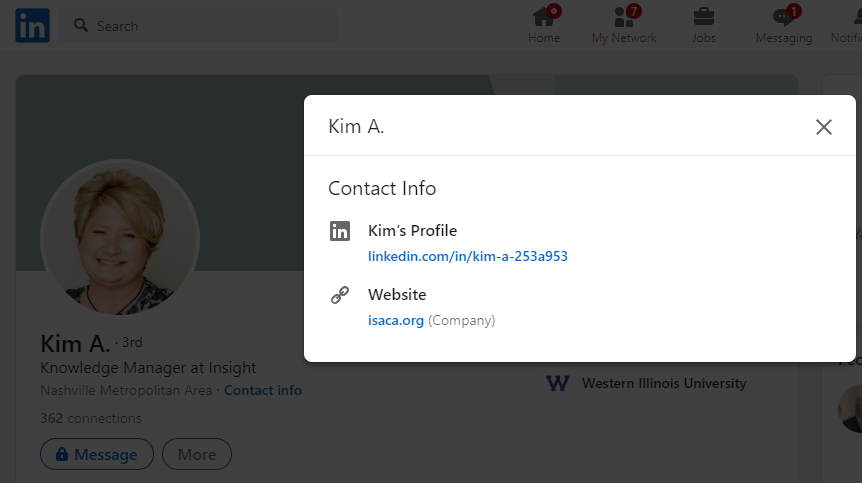
Here is a nice example of how to provide useful contact information, including a customized profile URL:

Profile URL

Give Your Professional Introduction

The About section of your LinkedIn profile is often overlooked, but it’s one of the most valuable spaces to tell your professional story. For Knowledge Managers, this 2,000-character space is your chance to highlight your expertise, share your goals, and outline the value you bring to organizations.

Unfortunately, many professionals leave this section blank or fill it with irrelevant details. Avoid common pitfalls like discussing hobbies or personal interests—hiring managers are looking for insights into your professional value, not your favorite TV shows.

Instead, use this space to explain how you can make a positive impact in your role as a Knowledge Manager.

Crafting an Effective About Section

Here’s what to include:

  • Overview of Your Experience: Summarize your career achievements and key responsibilities in knowledge management. For example, mention if you’ve implemented knowledge management systems, streamlined information processes, or enhanced team collaboration.
  • Future Goals: Share your ambitions and what you hope to achieve in your role. Focus on how you plan to contribute to future organizations.
  • How You’re Unique: Highlight what sets you apart—whether it’s a niche skill, a proven track record, or specific tools you excel at using.
  • Call to Action (CTA): End with a clear invitation for connections or opportunities, such as “Let’s connect to discuss how I can help your organization optimize its knowledge strategies.”

Tips for Writing Your About Section

  • Use Relevant Keywords: Incorporate terms like “knowledge management,” “knowledge systems,” “process optimization,” and “information architecture” to improve search visibility.
  • Focus on Results: Include measurable achievements, such as “Reduced document retrieval time by 30% through a revamped knowledge repository.”
  • Be Concise and Professional: Avoid lengthy paragraphs; use short, impactful sentences that are easy to read.
  • Emphasize Value: Explain how your skills have positively influenced past employers and how you intend to bring value to future roles.

Why Future Goals Matter

While showcasing past accomplishments is important, hiring managers are equally interested in where you’re heading. Sharing your future aspirations demonstrates ambition and alignment with potential employers’ goals. For instance, you might say:

  • “I aim to lead the development of scalable knowledge systems that improve team efficiency.”
  • “My goal is to drive organizational success by turning information into actionable insights.”

This forward-looking perspective can set you apart from other professionals in the field.

Checklist for a Strong About Section

  • An engaging summary of your experiences and expertise.
  • Future goals that align with your career aspirations as a Knowledge Manager.
  • Specific examples of how you add value to organizations.
  • Keywords that improve your profile’s searchability.
  • A clear and professional call to action.

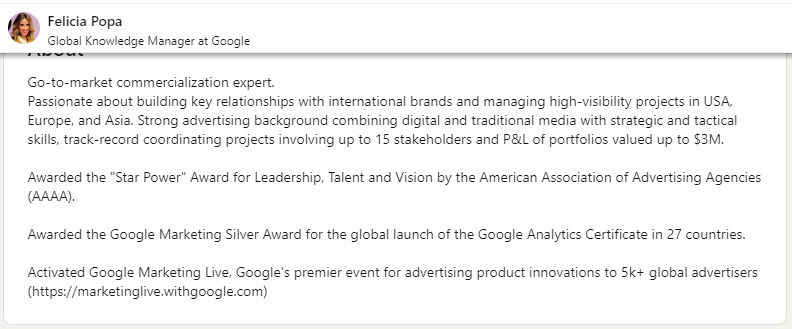
Here’s an excellent example of a knowledge manager’s About section:Knowledge Manager About Section

Upload a Customized Resume to Your Profile

Your resume is a powerful tool that complements your LinkedIn profile. To stand out in today’s competitive job market, it’s essential to customize your resume for each role you apply for. A generic resume often falls short—different roles may prioritize specific skills, experiences, or qualifications.

Why Customize and Upload Your Resume?

Employers increasingly rely on tools like applicant tracking systems (ATS) to scan resumes and profiles for keywords that match job descriptions. If your LinkedIn profile and resume aren’t optimized with relevant terms, you risk being overlooked.

Your LinkedIn profile tells the story of your professional journey, while your resume provides a concise snapshot of your accomplishments. Together, they create a complete picture of who you are as a Knowledge Manager.

For example, your resume can include case studies or projects where you:

  • Implemented knowledge management systems.
  • Improved team collaboration through process redesigns.
  • Increased efficiency by organizing and streamlining information systems.

Uploading your resume to LinkedIn allows recruiters to easily access more details about your expertise and achievements, helping you stand out.

How to Upload Your Resume on LinkedIn

There are multiple ways to attach your resume to your profile. Here’s one simple method:

  • Create a Post: From your LinkedIn homepage, click “Start a post.”
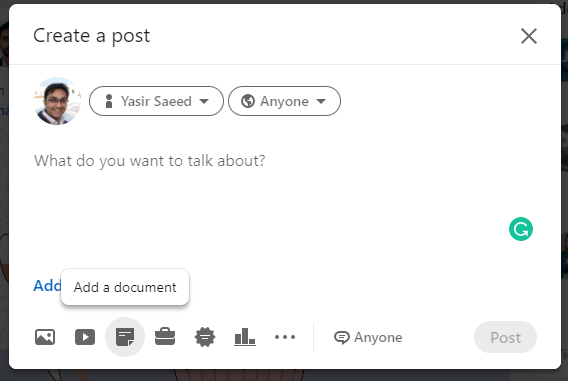
  • Add Your Resume: Click the Add a document option at the bottom of the post window.
  • Provide Context: Include a brief description highlighting your skills, expertise, and the purpose of the resume.
  • Use Relevant Hashtags: Add hashtags like #KnowledgeManagement, #KnowledgeManager, or #ContentOrganization to increase visibility.

This approach not only shares your resume but also generates engagement with your network.

Pro Tip for Knowledge Managers

Consider creating multiple versions of your resume tailored to different aspects of knowledge management, such as:

  • System implementation and process optimization.
  • Team training and knowledge transfer.
  • Data organization and accessibility improvements.

Attach the most suitable version when applying for specific roles or sharing your expertise.

Post

Show Your Work History

The Experience section on your LinkedIn profile is your opportunity to list your past roles, internships, volunteer work, and other relevant experiences. This section provides potential employers with valuable insights into your career journey, skills, and accomplishments.

Taking the time to properly fill out this section can significantly boost your chances of landing your ideal role. A well-documented work history highlights your contributions, awards, and key achievements, helping you stand out in a competitive field.

Tips for Optimizing Your Experience Section

  • Add the Company Name: Select the company from LinkedIn’s drop-down menu to link your profile to the organization’s page.
  • Enter Your Job Title: Use a keyword-rich title relevant to knowledge management, such as “Knowledge Manager” or “Information Systems Specialist.”
  • Include Location: Specify the location of each role to provide context.
  • List the Duration: Mention the start and end dates (e.g., “August 2021 – Present”).
  • Write a Compelling Description: Focus on accomplishments and the impact you had, rather than simply listing responsibilities. Use bullet points for clarity.

Example:

    • Designed and implemented a knowledge management system, reducing information retrieval time by 30%.
    • Led a cross-departmental team to streamline document workflows, improving efficiency by 20%.
    • Conducted training sessions for 50+ employees on knowledge-sharing best practices.
  • Highlight Achievements: Include awards, certifications, or public recognition of your work.
  • Attach Media: Add links to projects, presentations, documents, or videos that showcase your expertise. This could include case studies, process maps, or knowledge-sharing frameworks.

Best Practices for Structuring Work History

  • List Relevant Experiences: Focus on roles that align with your expertise in knowledge management.
  • Use Reverse Chronological Order: Place your most recent roles at the top.
  • Align Your Resume and LinkedIn Profile: Ensure consistency between the two to avoid confusion.
  • Focus on Achievements: Highlight measurable outcomes and the value you brought to each role.
  • Proofread Thoroughly: Grammatical errors or spelling mistakes can leave a negative impression. Use tools like Grammarly or hire a professional to review your profile.

Why Proofreading Matters

In a recent survey, over 70% of hiring managers reported encountering LinkedIn profiles with grammatical errors or typos. This can create a negative impression and reduce your chances of being contacted. Proofreading ensures your profile is polished and professional, making it easier for employers to trust your attention to detail.

Key Takeaway

A well-optimized Experience section demonstrates your expertise, measurable achievements, and professional growth. By showcasing your impact as a Knowledge Manager, you position yourself as a strong candidate for future opportunities.

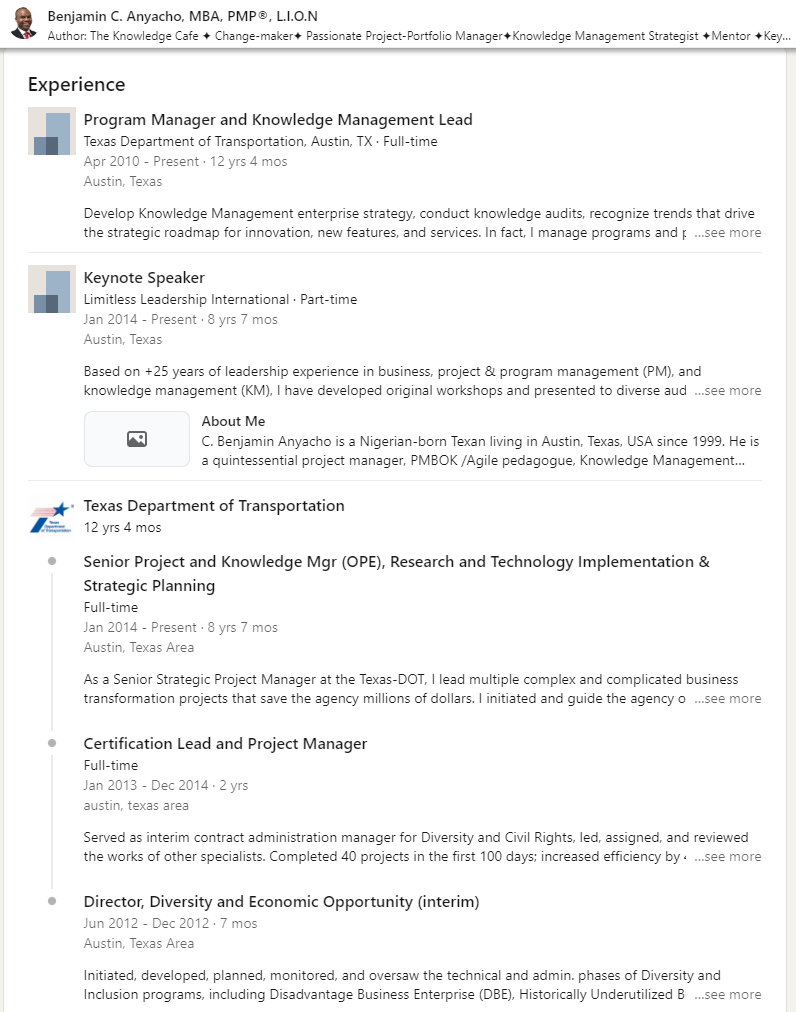
The Experience section on the LinkedIn profile should look like this:

Experience Section

Mention Your Education and Skills

Including your education and skills on LinkedIn is essential for creating a strong and complete profile. While your education provides insight into your background and knowledge base, your skills showcase your capabilities and expertise. Together, these sections play a significant role in increasing your visibility and making a positive impression on potential employers.

Studies show that profiles with a complete education section receive more attention—60% of LinkedIn users with detailed education sections have better exposure compared to those who don’t. In today’s competitive job market, ensuring your LinkedIn profile is complete and up-to-date can make a significant difference in landing the job you want.

How to Structure Your Education Section

LinkedIn provides three areas to highlight your educational background:

  • General Education: Add your formal degrees and qualifications. Include:
    • Name of the institution.
    • Degree title (e.g., Bachelor of Information Systems).
    • Awards or honors received (e.g., Dean’s List, academic scholarships).
    • Relevant projects (e.g., a thesis or capstone project related to knowledge management).
  • Certifications: Certifications add credibility and demonstrate your expertise. For Knowledge Managers, industry-specific certifications can set you apart. Examples include:
    • Certified Knowledge Manager (CKM): Offered by the Institute of Knowledge Management (IKM), this certification covers organizational culture, change management, and IT. It requires three years of experience and passing an examination.
    • Certified Information Professional (CIP): Offered by the Association of Information and Image Management (AIIM), this certification tests knowledge of records management, imaging systems, and document scanners. A minimum of five years of experience is required.
    • Professionals with certifications like CKM or CIP have been shown to receive up to six times better exposure on LinkedIn.
  • Courses: Include any relevant professional development or training courses. Examples might include:
    • Knowledge management systems training (e.g., SharePoint, Confluence).
    • Courses in taxonomy design, content strategy, or information architecture.

Here is what the Education section on LinkedIn should look like:
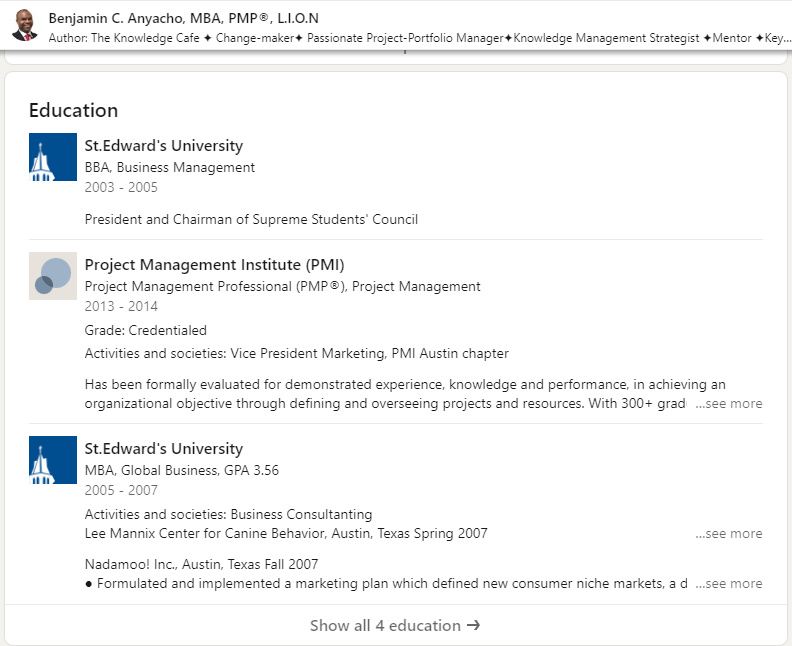
Education

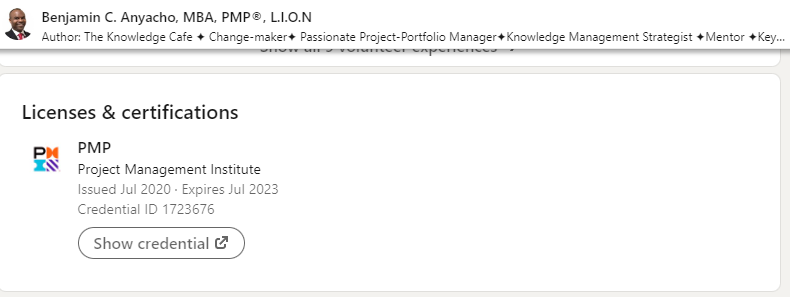
The following list of licenses and certifications gives a good impression of the Knowledge Manager:

Licenses and Certifications

How to Structure Your Skills Section

The Skills section is another critical area of your profile. It not only highlights what you excel at but also improves your visibility, as recruiters often search for candidates based on specific skills.

For Knowledge Managers, consider adding these skills:

  • Knowledge Management Systems.
  • Content Organization and Retrieval.
  • Process Optimization.
  • Information Architecture.
  • Collaboration Tools (e.g., Notion, Slack, Confluence).
  • Knowledge Strategy.

Pro Tip: Encourage colleagues or peers in your network to endorse your skills. Endorsements add credibility and help your profile stand out.

Adding Volunteer Experience

Volunteer work can be a valuable addition to your profile. It demonstrates your commitment to helping others and shows potential employers that you possess transferable skills, such as leadership, teamwork, and problem-solving.

When adding volunteer experience, focus on roles that align with your expertise or reflect your professional values. For example, volunteering to organize community knowledge-sharing sessions or digitizing records for a nonprofit organization is highly relevant for Knowledge Managers.

Why This Matters for Knowledge Managers

For Knowledge Managers, your education and skills are core to your professional identity. Certifications like CKM or CIP highlight your technical expertise, while relevant skills demonstrate your ability to deliver in your role. Together, these sections showcase your readiness to tackle complex challenges, implement systems, and drive organizational success.

By completing these sections and aligning them with your expertise, you position yourself as a well-rounded and competitive candidate in the field of knowledge management.

Checklist for Education and Skills

  • Add all relevant degrees, certifications, and courses.
  • For certifications, include details like the issuing organization and date of completion.
  • Highlight industry-relevant skills to boost your visibility in recruiter searches.
  • Use examples of transferable skills from volunteer work to enhance your profile.
  • Request endorsements from peers or colleagues for key skills.
  • Proofread your entries to ensure accuracy and professionalism.

Here is a practical way of adding volunteering experience and skills to your profile:
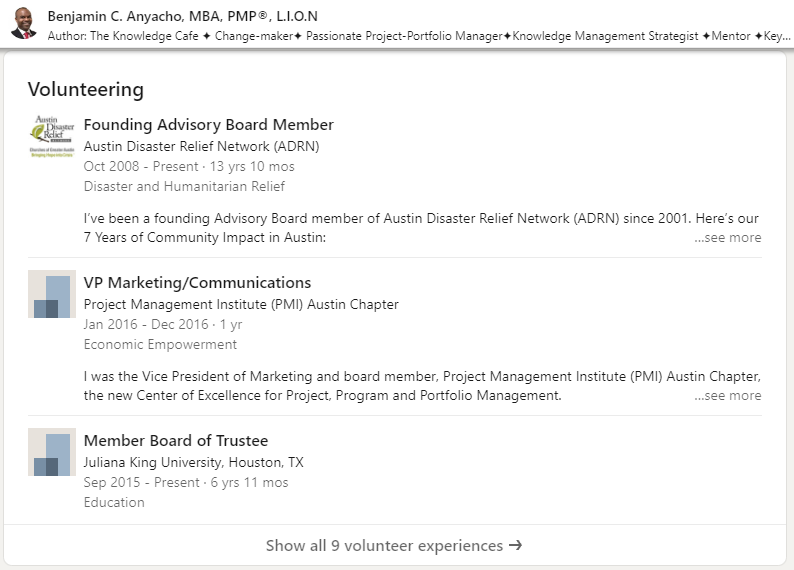
Skills

Broadcast Your Location

Your location plays a crucial role in connecting you with the right opportunities. Many recruiters use location filters to refine their candidate search. If your location isn’t listed or is inaccurate, you may miss out on potential job offers—even if you’re the perfect fit for the role.

Why Location Matters

For example, if you’re seeking a Knowledge Manager position in Washington, DC, but haven’t updated your profile to reflect this, you won’t show up in recruiter searches for that area. Including your correct location ensures you appear in relevant searches, increasing your visibility to local employers.

Tips for Adding Your Location

  • Be Specific: Provide the exact city where you currently reside or plan to move. For example, use “Washington, DC” instead of a broad or unclear term like “United States.”
  • Stay Accurate: If you’re relocating, update your profile to reflect your future location. This signals to recruiters that you’re available in the area.
  • Align Location Preferences: If you’re open to remote work but prefer certain cities, mention this in your About section or job preferences.

Pro Tip for Knowledge Managers

Knowledge management roles often involve collaboration and working closely with teams. Highlighting your location not only helps recruiters find you but also communicates your potential availability for in-person or hybrid roles. If you’re targeting specific industries or regions, ensuring your location is up-to-date is critical to connecting with the right opportunities.

Key Takeaway

Your location is more than just a detail—it’s a strategic part of your LinkedIn profile that can directly influence your visibility in recruiter searches. Keep it accurate and specific to improve your chances of landing the right job in your desired area.

Accurate City Name

Request Recommendations From Connections

Recommendations on LinkedIn are powerful testimonials that go beyond skill endorsements. They provide a detailed, personalized account of your professional contributions and the impact you’ve made on others. These testimonials from clients, colleagues, or supervisors help establish credibility and increase your visibility on the platform.

How to Get Strong Recommendations

  • Reach Out to Past Employers or Colleagues: Ask former managers, team members, or clients who have firsthand experience working with you to write a recommendation. Focus on individuals who can speak to your expertise in knowledge management, collaboration, or leadership.
  • Be Specific in Your Request: When asking for a recommendation, tailor your request by mentioning key skills or accomplishments you’d like them to highlight. For example:
    • “Could you share a recommendation that highlights how I organized and implemented the new knowledge management system for our team?”
    • “I’d appreciate it if you could write about our collaboration on process optimization for the content repository.”
  • Focus on Quality, Not Quantity: A few detailed and personalized recommendations are far more impactful than many generic ones. Aim for recommendations that reflect your unique skills and contributions.
  • Reciprocate Thoughtfully: Offer to write a recommendation for someone in return. This creates goodwill and strengthens relationships within your network.

Why Recommendations Matter for Knowledge Managers

For Knowledge Managers, recommendations validate your ability to streamline processes, implement systems, and drive organizational improvements. A recommendation might highlight:

  • Your ability to manage and organize complex information ecosystems.
  • Success in training teams or leading knowledge-sharing initiatives.
  • Proven results in improving efficiency or accessibility through knowledge management tools or strategies.

Pro Tip

Make it a habit to request recommendations after completing major projects or milestones. This ensures the feedback is specific, fresh, and relevant to your most recent accomplishments.

Key Takeaway

Recommendations provide a credible, third-party perspective on your skills and impact. Thoughtfully curated testimonials from trusted connections can greatly enhance your profile’s appeal to recruiters and hiring managers.

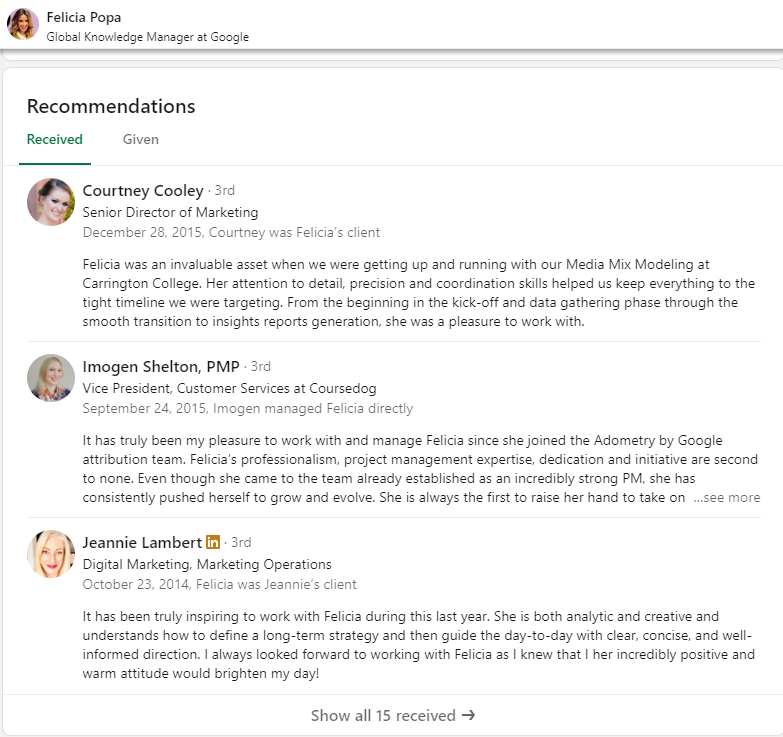
The following is a great example of recommendations for Felicia Popa, Global Knowledge Manager at Google:

Felicia Popa

Use the Creator Mode

Looking to build your personal brand and establish credibility in knowledge management? LinkedIn’s Creator Mode is a powerful feature that helps you showcase your expertise, grow your network, and engage with the professional community. By creating relevant content, such as blog posts, articles, videos, or even thoughtful comments on industry-related posts, you can position yourself as an authority in your field.

Benefits of Creator Mode

Activating Creator Mode on LinkedIn unlocks several advantages:

  • Follow Button: The “Connect” button on your profile changes to “Follow,” making it easier for others to stay updated with your posts.
  • Showcase Followers: Your profile will display followers in addition to connections, enhancing your visibility.
  • Content Visibility: Highlights your posts and articles, prioritizing your content over your work experience.
  • Build Your Brand: Helps you establish a strong personal brand identity as a thought leader in knowledge management.
  • Access to LinkedIn Live: Create live video sessions to share insights, host Q&As, or discuss trends in your industry.
  • Newsletter Feature: Publish LinkedIn articles that reach subscribers directly through push and email notifications, expanding your audience.

Tips for Knowledge Managers Using Creator Mode

  • Focus on Relevant Topics: Share content about knowledge management trends, tools, and strategies. For example, write about implementing knowledge-sharing systems or improving organizational efficiency.
  • Be Consistent: Post regularly to stay visible and engage with your audience.
  • Engage with Others: Comment on posts from peers or industry leaders to build connections and spark meaningful discussions.
  • Experiment with Formats: Use a mix of posts, articles, videos, and even LinkedIn Live sessions to diversify your content and keep your audience engaged.
  • Highlight Case Studies: Share examples of successful knowledge management initiatives you’ve worked on to demonstrate your expertise.

Key Takeaway

Creator Mode is a valuable tool for Knowledge Managers looking to elevate their professional presence on LinkedIn. By consistently creating and sharing relevant content, you can build authority, engage your network, and attract the right opportunities.

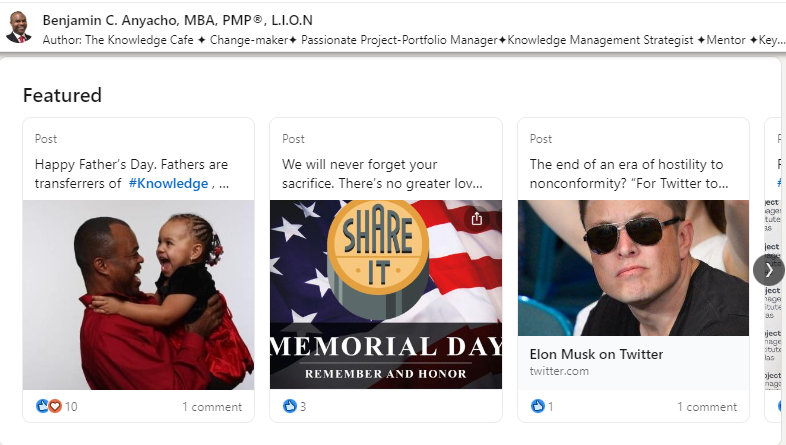
Here is how this knowledge manager has used this feature:

Knowledge Manager Featured Section

Showcase Your CTAs and Portfolio in the Featured Section

The Featured section on LinkedIn is a great way to highlight your expertise and make your profile stand out. It allows you to showcase portfolio links, such as:

  • Sample knowledge management processes.
  • Your resume.
  • A consultation link.
  • Certifications or relevant training.
  • Case studies or other resources that demonstrate your value.

This section provides an easy way for potential employers or clients to access your work and understand your professional contributions.

How to Add Work Samples to Your Featured Section

Here’s how to update your Featured section:

  • Go to Your Profile: Tap your profile photo on the LinkedIn homepage and select View Profile.
  • Add a Section: Tap Add section.
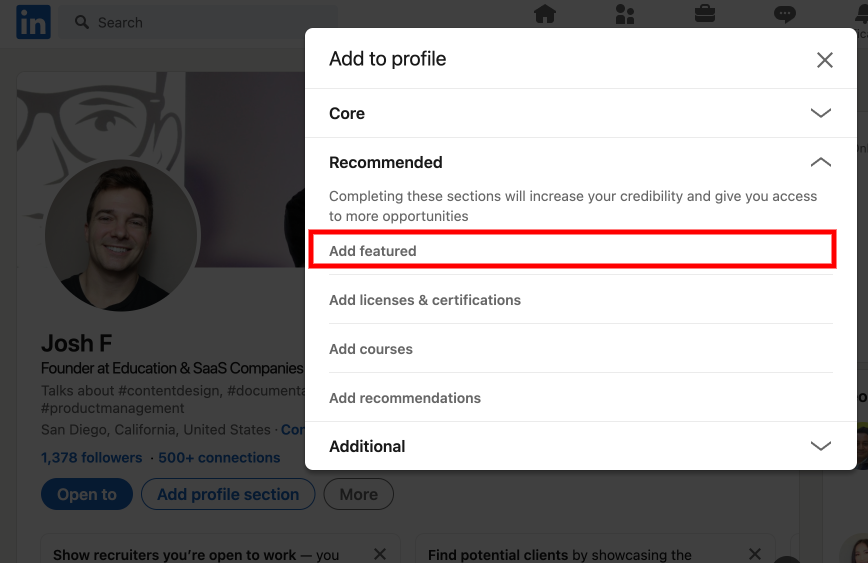
  • Choose Featured: Under Recommended, select Add featured from the dropdown menu.
  • Select Content Type: Choose the type of content you’d like to showcase, such as links, media, or posts.
  • Save Your Updates: Tap Save or Done to finalize your changes.

Practical Example for Knowledge Managers

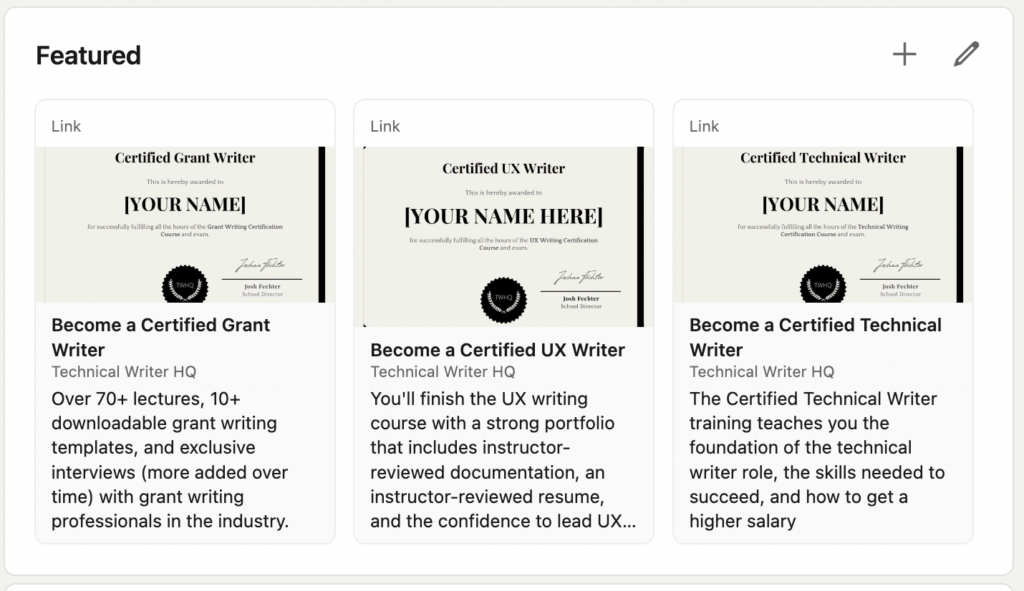
For example, on my LinkedIn profile, I’ve added certifications offered by Technical Writer HQ. These certifications are linked directly to their respective pages, allowing anyone interested to sign up for the course.

As a Knowledge Manager, you can use this space to link:

  • A case study demonstrating how you implemented a knowledge-sharing framework.
  • A presentation on best practices for knowledge management.
  • A consultation link for businesses looking to optimize their knowledge systems.

Pro Tip

Identify the type of audience or persona you want to attract (e.g., hiring managers, clients, or collaborators) and tailor the links in your Featured section to meet their needs. Use this area to showcase your expertise and make it easy for others to see your value.

Key Takeaway

The Featured section is a powerful tool to highlight your achievements and direct viewers to your most impactful work. By thoughtfully curating this section, you can engage the right audience and enhance your professional brand as a Knowledge Manager.

Add featured

On my LinkedIn profile, I went ahead and added several of the certifications that Technical Writer HQ provides. This way if someone clicks on any of these featured links, they get taken right to the certification pages on Technical Writer HQ to sign up for the course.
Certified Features

Narrow down the persona who you need to get in touch with and provide the links here that will make that happen by showcasing your value.

Closing Thoughts

LinkedIn remains the most popular platform for recruiters seeking top talent in knowledge management. To stand out, it’s essential to invest time in crafting a polished and professional profile. A strong Knowledge Manager LinkedIn profile includes an optimized About, Experience, and Education section, along with relevant skills, certifications, and a compelling Featured section.

We hope this guide has provided you with actionable insights to enhance your LinkedIn presence. Now it’s time to apply these tips and position yourself for your next career opportunity!

FAQs

Why is LinkedIn important for Knowledge Managers?

LinkedIn is a key platform for showcasing your expertise, networking, and connecting with recruiters. A well-optimized profile highlights your accomplishments and skills in knowledge management, increasing your chances of being discovered by potential employers.

What sections are most important for a Knowledge Manager’s LinkedIn profile?

The most critical sections include:

  • About: A summary of your expertise, accomplishments, and future goals.
  • Experience: A detailed account of roles, achievements, and measurable results.
  • Education: Degrees, certifications, and relevant courses.
  • Featured Section: Portfolio links, case studies, and CTAs to showcase your work.

How can I make my profile more visible to recruiters?

  • Use relevant keywords (e.g., “knowledge management,” “information organization”).
  • Add certifications like CKM or CIP.
  • Regularly update your profile with new skills, projects, and accomplishments.
  • Activate Creator Mode and share relevant content to build authority.

Should I include certifications, and which ones are most relevant?

Yes, certifications add credibility and help you stand out. Relevant certifications for Knowledge Managers include:

  • Certified Knowledge Manager (CKM).
  • Certified Information Professional (CIP).
  • Certifications in tools like SharePoint, Confluence, or similar systems.

How does Creator Mode help Knowledge Managers?

Creator Mode helps you build a personal brand by promoting your content, increasing visibility, and engaging your audience. It unlocks features like LinkedIn Live and newsletters to expand your professional reach.

Is it important to customize my LinkedIn URL?

Absolutely. A personalized URL (e.g., linkedin.com/in/yourname) improves your branding and makes it easier for recruiters to find you.

How can I request recommendations effectively?

Reach out to past colleagues, managers, or clients who can speak to your contributions. Be specific about what you’d like them to highlight, such as your expertise in implementing knowledge systems or leading successful projects.

What should I include in my Featured section?

Your Featured section can include:

  • Sample knowledge management processes.
  • Case studies or project results.
  • Certifications and training links.
  • A consultation link or portfolio.

How often should I update my profile?

Regular updates are key. Revisit your profile at least once a quarter to add new achievements, update skills, or refresh your content.

What’s the best way to ensure my profile is error-free?

Proofread your profile carefully or use tools like Grammarly to catch grammatical errors and typos. For a more polished result, consider hiring a professional editor.

If you’re new to knowledge management and are looking to break in, we recommend taking our Knowledge Manager Certification Course, where you will learn the fundamentals of knowledge management, how to dominate knowledge manager interviews, and how to stand out as a knowledge management candidate. 

Josh Fechter
I’m the founder of Technical Writer HQ and Squibler, a writing software platform. I landed my first technical writing job at a video-editing software company in 2014, and since then I’ve written several books on software documentation, personal branding, and computer hacking. You can connect with me on LinkedIn here.