Our reviewers evaluate career opinion pieces independently. Learn how we stay transparent, our methodology, and tell us about anything we missed.

Our reviewers evaluate career opinion pieces independently. Learn how we stay transparent, our methodology, and tell us about anything we missed.
I’ve seen HR teams do “document management” with shared drives and good intentions, and it works right up until it doesn’t. The moment you have a termination, a legal request, or an audit, the cracks show fast because nobody can confidently answer: “Who had access, what changed, and when did we delete it?”
This guide is the set of best practices I’d follow to keep HR documentation secure, searchable, and defensible, without turning your HR team into full-time librarians.
HR document management gets easier when you acknowledge one thing upfront: not all HR documents should be treated the same. Some are operational and low-risk. Others are confidential and should be separated by design.
Most organizations manage a mix of personnel files (employment contracts, job descriptions, disciplinary action reports), onboarding paperwork (tax forms, acknowledgements, training records), payroll records, and performance review files. Many also manage benefits information and compliance documents that can trigger retention rules and audits.
The tricky category is medical records and anything “health-related.” Even when HIPAA does not apply to typical employment records, you still want strict controls because privacy expectations and other laws can still apply. HHS makes it clear that HIPAA’s Privacy Rule does not protect employment records, even if they contain health-related information.
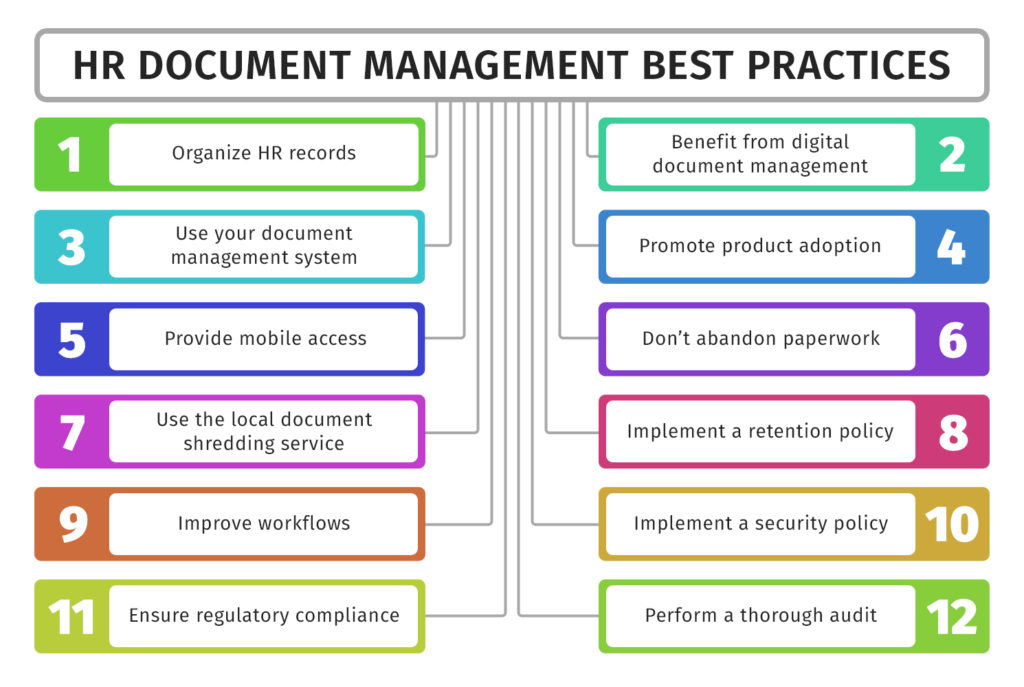
If you want HR document management to feel effortless, you need a structure that matches how HR actually searches. In my experience, HR searches by person, document type, and date far more than by department folder.
Start with a simple employee file folder structure, then add consistent subfolders and naming conventions. The goal is that two different HR coordinators can store the same document in the same place without debating it.
Metadata tagging is where this becomes scalable. Even basic metadata like document type, effective date, and status (draft, signed, archived) makes advanced search features work like a superpower instead of a nice-to-have.
HR is the department where “everyone can access the folder” is basically guaranteed to backfire. You want a permission model that is strict by default and expands only when there is a real business need.
Here’s how to build a secure access model:
Defining your retention policies before building your document management system is critical. If you build the system first, you risk keeping everything indefinitely “just in case,” which creates its own compliance risks.
Here’s how retention policies align with major regulations:
If you want a broader foundation for how systems support compliance, read our overview on document management and map those principles to HR-specific needs.
HR document management improves significantly when you stop relying on people to remember steps. Automation reduces manual errors, and in HR, small errors can quickly become big problems.
Here are key areas where automation can make an immediate impact:
Good HR document management benefits both HR teams and employees, improving efficiency and reducing friction.
If you need additional guidance, check out good documentation practices to establish internal standards for consistency and clarity.
HR documents are the last place you want a “we lost the folder” story. A disaster recovery plan is not just an IT checklist, it’s a key part of your HR risk posture.
Here are the essential steps for disaster recovery:
HR repositories degrade over time unless you maintain them. New document types appear, folder structures sprawl, and permissions drift as roles change.
Set a cadence for regular folder reviews, permission reviews, and retention schedule checks. If your system supports automated alerts and reminders, use them to flag documents nearing retention thresholds or missing required metadata.
Audit trails help you verify behavior, not just policy. When you can see access patterns and change activity, it’s easier to spot risky habits before they become incidents.
HR document management is about balancing security, compliance, and efficiency. By using role-based access controls, automation, and disaster recovery plans, HR teams can protect sensitive data while simplifying operations.
A strong system benefits both HR and employees. Clear policies, efficient onboarding, and easy access to records reduce friction and improve the experience for everyone.
Focus on automation, clarity, and proactive planning to keep your HR documentation secure, organized, and audit-ready.
Below I answer the most frequently asked questions about HR document management best practices.
If I had to pick one, it’s role-based access control with an audit trail. Organization matters, but security and traceability are what keep HR safe when something goes wrong.
Once access is controlled, everything else becomes easier to enforce, including retention and workflow consistency.
Usually no. Even when HIPAA does not apply to employment records in the way people assume, medical information still deserves stricter handling. HHS notes that HIPAA’s Privacy Rule does not protect employment records, even if health-related information is present, which is a good reminder that employers still need other safeguards and policies.
Separate storage plus stricter permissions reduces the blast radius if access is misconfigured.
USCIS states employers must keep Form I-9 for three years after the date of hire, or one year after employment ends, whichever is later.
Your organization may also have additional requirements depending on jurisdiction and policy, so treat this as a baseline and confirm with counsel.
Start with onboarding workflows. Onboarding is predictable, document-heavy, and time-sensitive, so automation reduces delays and missing paperwork fast.
After that, automate retention alerts and recurring compliance reviews, since those are easy to forget until an audit forces attention.
It can be, but the security outcome depends on configuration. The best cloud setups combine encryption, strong authentication, role-based permissions, and good access logging.
The most common failure mode is not the cloud. It’s overly broad sharing settings that nobody revisits.
Get the weekly newsletter keeping 23,000+ technical writers in the loop.
Learn documentation engineering and advance your career.
Please check your email for a confirmation message shortly.





















Get our #1 industry rated weekly technical writing reads newsletter.
Your syllabus has been sent to your email