Our reviewers evaluate career opinion pieces independently. Learn how we stay transparent, our methodology, and tell us about anything we missed.

Our reviewers evaluate career opinion pieces independently. Learn how we stay transparent, our methodology, and tell us about anything we missed.
I remember the first time I realized we didn’t have a document workflow, we had a “hope someone handles it” system.
At the time, I was working with a small team, and every document felt like it was on its own adventure. Someone would draft it, toss it into Slack, tag two people, and then… silence. A week later, we’d be asking, “Wait, was this approved?” That’s when it hit me: we didn’t need better people. We needed a better path.
That’s how I started thinking about document workflow management. It’s the structure that answers, “Who touches this next?” and “What has to happen before it’s official?” Yes, it sits under business process management. But in real life, it’s just how you stop approvals, distribution, versioning, and archiving from becoming organized confusion.
And here’s the part that still makes me laugh. Every team I’ve worked with insists they don’t have workflow problems. Then I ask where their process lives. The answer is: inboxes, Slack threads, or “Oh, Sarah handles that.”
The issue isn’t that teams don’t have a process. It’s that the process only works as long as the same people are around to remember it. The second someone goes on vacation, or worse, leaves, everything stalls. That’s the moment leadership decides workflow matters.
If you’re looking for the broader “what is this discipline” context, I like anchoring this topic within a bigger view of document management because it clarifies where practices end, and systems begin.
Most document problems are consistency problems.
When teams don’t follow shared practices, you get the usual symptoms: duplicate files, confusing folder structures, missing owners, and version chaos. Over time, people stop trusting the system, and your “repository” becomes a place people avoid unless they have no choice.
This is more than operational frustration. The Verizon Data Breach Investigations Report shows that internal access control failures and mismanaged data are leading contributors to security incidents.
Policies and procedures are how you standardize behavior across the org. They don’t need to be long, but they do need to be clear enough that a new hire can follow them without tribal knowledge.
A strong document management policy defines what counts as an official document, who owns each document type, how approvals work, how documents are named, and where they must live. It also defines what people should do instead of emailing attachments around.
If you need a more structured control model for approvals and distribution, you can borrow concepts from a document control process, even if your environment isn’t regulated.
Good organization is about making retrieval predictable, even when your repository grows, and the original creators leave the company.
I like a single source of truth with a hierarchy that matches how people search: by department, process, product, or customer-facing area. The point is that a user should be able to guess where a document lives before they search.
When teams start with “everything goes in one giant folder,” they end up recreating structure in file names, which is how the “final_final” culture starts.
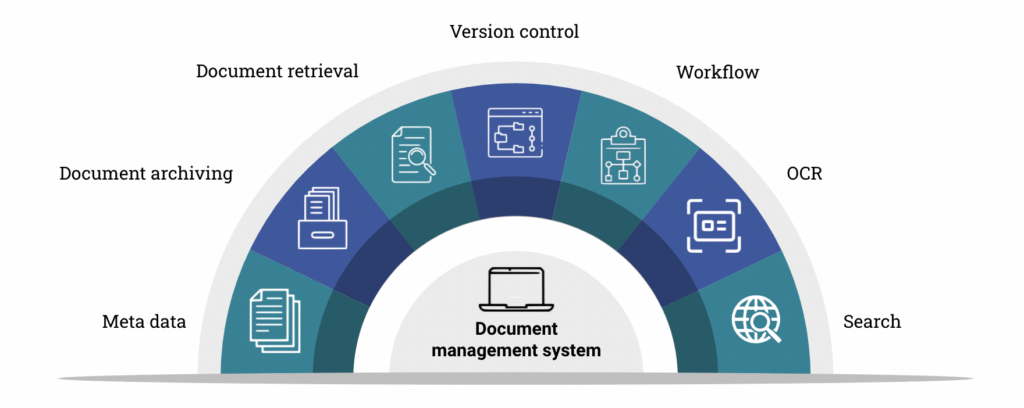
Folders alone don’t scale well, so metadata becomes the multiplier. Common fields that are useful in real work include owner, status, department, document type, and effective date.
Tagging works too, but only when it’s standardized. If everyone invents their own tags, you end up with twenty labels that mean the same thing.
Retrieval is the moment of truth. If people can’t find what they need quickly, they’ll either stop using the system or they’ll build shadow systems.
Advanced search works best when your titles, naming conventions, and metadata are consistent. If your tool supports filters, use them as defaults rather than leaving users to guess how to narrow results.
If you’re evaluating tools, it helps to understand which features matter in a document management system because search, indexing, and permissions are the biggest leverage points.
Real-time co-authoring is useful, but it needs guardrails. Published docs should be clearly labeled, and drafts should have visible ownership so edits don’t turn into silent changes.
When collaboration gets messy, it’s often because there’s no clear “publish” moment. Defining that moment is one of the most underrated practices you can adopt.
Security is where document management goes from “nice to have” to “risk management.” The goal is to protect sensitive information without making daily work impossible.
Role-based access controls are easier to maintain than individual permissions, and they’re easier to explain during audits. I build permissions around least privilege, meaning people get only what they need to do their job.
A simple model most teams understand looks like this:
If your documents include confidential information or regulated records, strong user authentication and encryption are table stakes. Audit logging is also valuable because it helps you track access and changes without relying on memory.
Backups matter too, but they need to be tested. “We have backups” is not the same as “we can restore what we need under pressure.”
Remote access is a reality for most teams, so secure access protocols and device policies need to be part of the plan. If your system is difficult to access securely, people will route around it, which creates more security risk, not less.
Documents have a lifecycle whether you manage it or not. When you handle it with intention, your repository remains a reliable source of truth rather than a dumping ground for outdated policies.
Retention policies should reflect legal requirements, compliance needs, and business value. For regulated industries, the U.S. Securities and Exchange Commission record retention requirements show how specific timelines must be defined for preserving and disposing of business documents.
Disposal rules should ensure you retire documents without deleting records you may need later.
If you want a lifecycle framework that makes this easier to implement, using document lifecycle management as your mental model helps because it forces you to plan beyond creation and storage.
Audit trails matter because they show how documents changed over time and who approved those changes. Disaster recovery matters because losing documents can be as damaging as using the wrong ones.
Even lightweight teams benefit from a basic plan: where backups live, how restores work, and who owns the process.
Automation is useful when it reduces repetitive routing, reminders, and capture work. It becomes counterproductive when it adds complexity faster than it removes effort.
Approval and review processes benefit from automation because status becomes visible and consistent. Digital notifications and reminders keep review cycles from turning into “we’ll get to it eventually.”
If your org is ready for tooling, it’s worth looking at how document control software handles routing, reminders, and audit trails, as these features often eliminate the most manual work.
Document workflows don’t live in isolation. Integrations with chat tools, ticketing systems, and e-signature platforms reduce context switching and help teams adopt the process without friction.
This is also where KPIs become useful, as you can measure cycle time and bottlenecks rather than guess.
Version control is the practice that prevents “we used the wrong document” incidents. It’s also one of the easiest places for teams to drift when they rely on file names as a versioning strategy.
A version history should tell users what changed, when it changed, and who approved it. Version numbers should be consistent and visible where the document is consumed, not hidden in a backend field nobody checks.
If you want a deeper breakdown of versioning mechanics and best practices, I cover it in my guide to document version control.
Some teams need check-in/check-out to prevent conflicting edits for controlled or sensitive documents. It’s not always necessary, but it’s valuable when concurrent edits create risk.
The goal is to protect document integrity without slowing every change to a crawl.
Document management practices don’t stick because they’re written down. They stick because people are trained, reminded, and supported.
Training should cover how to find documents, request changes, and publish updates. I also like quick “spot checks” for high-risk document types because they reveal where confusion still exists.
A few KPIs go a long way: time to approval, overdue review cycles, number of version conflicts, and search success rate. When something is broken, root cause analysis is better than patching symptoms.
Continuous improvement is system maintenance. If you don’t do it, the repository degrades, trust erodes, and people revert to workarounds.
For me, strong document management has never been about designing a perfect structure upfront. It’s about building habits that the organization can sustain. I’ve learned that consistency beats cleverness every time. When people know how to name, store, update, and retrieve documents, everything moves faster, decisions get easier, and the risk of mistakes drops.
If I need a practical starting point, I define clear policies, centralize storage, enforce role-based access, make search work through metadata, automate reviews when they save effort, and then keep improving based on real usage metrics.
Here I answer the most frequently asked questions about the best document management practices.
If you’re starting from scratch, I’d begin with a central repository, naming conventions, basic metadata, role-based permissions, and a clear publish/review workflow. Those five practices prevent most of the early chaos.
Start by improving titles, adding consistent metadata, and creating a small set of navigation pages for high-traffic content. Once the search improves, you can tackle structural changes in smaller, safer phases.
Make the repository link the source of truth, keep version history visible, and limit publishing rights. When you combine those with clear review and approval steps, version confusion drops.
Get the weekly newsletter keeping 23,000+ technical writers in the loop.
Learn documentation engineering and advance your career.
Please check your email for a confirmation message shortly.





















Get our #1 industry rated weekly technical writing reads newsletter.
Your syllabus has been sent to your email