Our reviewers evaluate career opinion pieces independently. Learn how we stay transparent, our methodology, and tell us about anything we missed.

Our reviewers evaluate career opinion pieces independently. Learn how we stay transparent, our methodology, and tell us about anything we missed.
Over the years, I’ve designed a lot of websites (50+ at this point) and tested a ton of UX copy. I learned the hard way that you can have a beautiful UI, but if the content doesn’t match users’ expectations at each step, the experience falls apart fast.
I’ve also been on the other side of it; writing documentation with subject matter experts who spoke in jargon, then translating that into something normal humans could actually use. That translation muscle is the same muscle you use in UX content strategy.
A lot of content strategy posts stay vague on purpose. They’ll say “align stakeholders” and “define your voice,” then leave you staring at a blank doc.
This one’s different. I’m going to walk you through the pillars I use so you can make decisions, not just collect buzzwords.
Content strategy in UX is the plan for how your product communicates across the entire experience—onboarding, errors, settings, upgrade flows, empty states, emails, and everything in between. When I say “plan,” I don’t mean a 40-page deck that nobody reads.
I mean a practical system that answers: what does the user need right now, what do we call things, what tone do we use, and who owns updates when the product changes.
If you’re new to the space, it helps to separate craft from system. UX writing is the microcopy; content strategy is the structure that keeps that microcopy coherent over time.
If you want the deeper version, read my full guide on what UX writing is, and then my breakdown of what a UX writer actually does day to day.
If you’ve ever watched someone struggle with onboarding and say “I don’t get what they want me to do,” that’s not a “writing” problem. That’s a strategy problem.
Content strategy matters because content is the interface. The words are how users understand the product, make decisions, and feel confident they’re not about to mess something up.
I like using Brain Traffic’s content strategy quad as a gut-check because it forces you to think beyond the words. It’s a reminder that substance, structure, workflow, and governance are all part of the outcome.
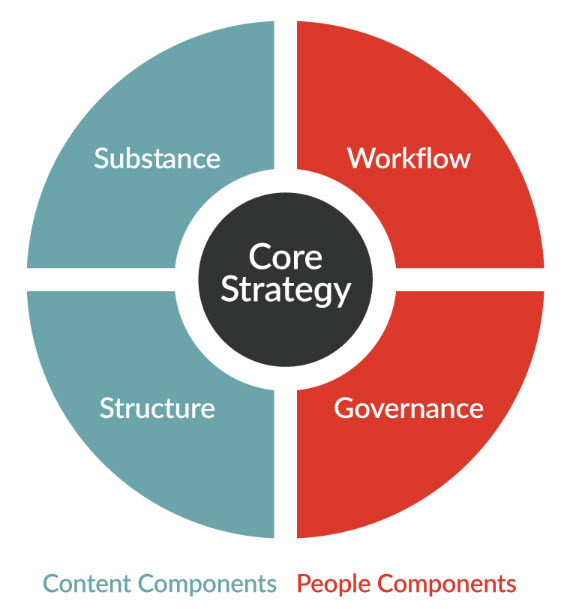
Image Source: Braintraffic
In real product work, you’re mediating tension: designers push for minimal UI, engineers push for feasibility, stakeholders push for conversion, and users beg for clarity. Content strategy is how you turn that tension into decisions that hold up.
If you want the career lens on this, check out what a content strategist does.
Before you plan content, you need a shared definition of what “good UX” even means. Otherwise, content decisions become a taste contest.
One framework I like (and that shows up in a lot of UX education) is Peter Morville’s UX honeycomb: useful, usable, desirable, findable, accessible, credible, valuable. In your current article layout, this is where the honeycomb image belongs, because it anchors the idea that content isn’t separate from UX—it’s part of every facet.
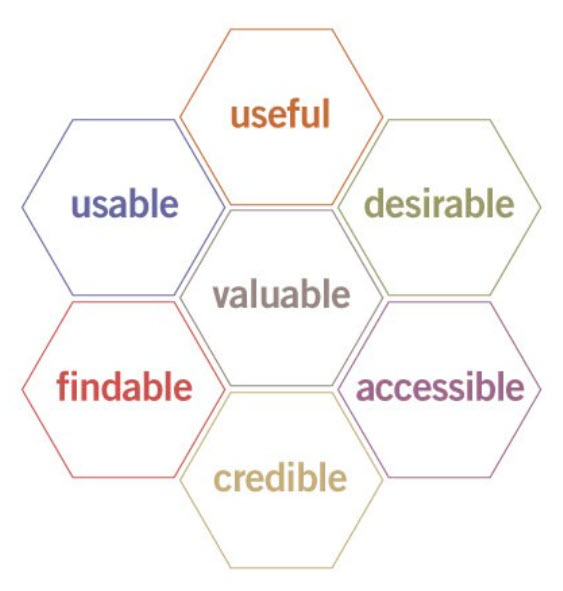
Image Source: Semanticstudios
Here’s how I translate that honeycomb into content decisions. I ask whether the content is useful (does it move the user forward), usable (is it scannable and unambiguous), and credible (does it build trust instead of raising suspicion). Then I check findability and accessibility, because “good” content that people can’t locate or consume still fails in practice.
If you want the fuller view of how content designers think about this, read what content design is.
One of the fastest ways for product content to degrade is unclear ownership. Everyone assumes “someone else” is handling it, then the product ships, the UI changes, and the copy becomes a patchwork.
In practice, UX content strategy touches UX writers/content designers, UX content strategists, product designers, researchers, developers, and stakeholders (PM, marketing, legal, support). The specific titles matter less than the handoffs.
I’m not a fan of rigid job boundaries, but I am a fan of explicit responsibility. I like using a simple decision-making breakdown: who writes, who reviews for UX clarity, who reviews for brand voice, who merges it, and who owns updates after launch.
If you’re trying to understand how this maps to career paths, skim UX writer vs technical writer. If you’re building the cross-functional muscle, this guide on content strategist skills is a strong checklist.
Whenever people ask me, “What’s the process for content strategy in UX?” they want a neat linear workflow. Real life is messier, but the same steps keep showing up in every product that doesn’t feel chaotic.
First, I evaluate what exists. I do a content audit across labels, navigation, onboarding, errors, settings, and key comms like emails or push notifications, looking for duplicated concepts, conflicting terms, unclear instructions, and “guessing moments.”
Next, I map content to user goals. I’m trying to understand what the user wants at each step, what we need from them, and the minimum viable clarity required to move forward without anxiety.
Then I define the rules. This is where voice/tone, terminology, button-label patterns, error structure, confirmations, and empty-state patterns are standardized so teams aren’t reinventing language every sprint.
If you want examples of how teams document these rules, here are technical writer style guide examples that translate surprisingly well to UX.
After that, I write in context. I prefer writing directly in Figma, prototypes, or the component system, because constraints show up immediately and you stop making “copy promises” the UI can’t support.
Then I test and iterate. Even quick usability checks surface assumptions that would’ve shipped unnoticed, especially when the team says “users will know what this means.”
Finally, I set governance. If you skip governance, the strategy dies, because nobody owns updates, localization gets messy, and one-off phrasing creeps in until everything feels inconsistent again.
Master all these UX content strategies and mandatory skills to become a certified UX writer through our course:

A user-centered content approach sounds obvious until you watch how product decisions get made. Most teams don’t start with user intent; they start with a feature and then scramble to explain it.
So I start with intent. What is the user trying to accomplish right now, and what’s the smallest set of words that helps them do it confidently?
Then I look at the risk. What’s the worst misunderstanding that can happen on this screen, and how do we prevent it without turning the UI into a wall of text?
This is where research matters, interviews, usability testing, focus groups, and conversation mining from support tickets. Anything that shows how users describe the problem in their own words is more useful than internal terminology.
A practical habit I love: build a user language bank. Every time research or support reveals a phrase users naturally say, capture it, because it becomes your best source for labels, help text, and terminology decisions.
If you’re learning how to develop this skill from scratch, here’s my roadmap on how to become a content strategist.
I’m going to say something slightly annoying: content strategy doesn’t live in documents. It lives in collaboration.
The best UX content I’ve seen came from active communication between designers, developers, researchers, and writers, not because everyone “brainstormed,” but because constraints surfaced early and decisions got made in the open.
UX content is coupled to design (space and hierarchy), engineering (states, data availability, localization), business (pricing and compliance), and support (what actually confuses users). When those groups don’t talk, copy becomes a last-minute patch, and strategy becomes an afterthought.
If you want examples of microcopy patterns across industries, here are my UX writing examples I use for alignment.
Consistency is one of those UX principles everyone agrees with, right up until someone wants to ship a one-off. Then you end up with a product that sounds like three different companies stitched together.
In content strategy, consistency means the product speaks like one product. Same terminology, same level of formality, same grammar standards, and the same tone in similar situations.
I split this into two layers. Brand voice is stable (personality and vocabulary), while tone is contextual (how the voice shifts for success, errors, warnings, and high-risk actions).
If you’re also thinking about structure and naming, you may find information architecture vs sitemap helpful, because “structure vs navigation” is where consistency often breaks.
Most teams write UX content screen by screen. That’s fine early on, but at scale, it creates a disjointed experience.
Content strategy is about stepping back to map content across user journeys so the right message appears at the right moment, in the right tone. Users don’t experience “screens,” they experience a sequence of decisions, and content should guide that sequence.
I typically map journeys from discovery to onboarding to core use, then through troubleshooting and growth moments like upgrades. Once you do that, content gaps become obvious, too much jargon too early, missing reassurance during high-risk actions, and inconsistent terminology between marketing and product.
If you want content strategy taken seriously, you have to measure it. Not because everything needs a KPI, but because content decisions affect user behavior in measurable ways.
I look for signals like drop-off in onboarding flows, repeated errors, time spent stuck on steps, in-product search queries that reveal “missing” language, and support tickets that repeat the same confusion. Then I pair that with qualitative feedback from usability tests so the metrics aren’t interpreted in a vacuum.
If you want a deeper list of what to track, here are technical writing metrics that translate well to UX.
A simple habit that pays off fast: anytime you ship a meaningful content change, write down what you expect to happen and how you’ll know. That turns “we tweaked the copy” into a testable hypothesis.
If you only take one pillar seriously, make it this one. Accessibility and inclusivity in UX content strategy aren’t just about compliance; they’re about ensuring users can engage with your product regardless of ability, and they usually improve clarity for everyone else.
Accessible UX content strategy means you write with assistive tech in mind and reduce cognitive load. It means your error messages are actionable, your labels work for screen readers, and your content doesn’t rely on hidden assumptions or “insider language.”
Two resources I point teams to are Microsoft’s Inclusive 101 guidebook and W3C’s WCAG 2.2 quick reference. They’re both practical, and they give teams a shared baseline when opinions start flying.
And yes—this is a user testing problem, too. Don’t only test with “average” users; include people who use assistive tech, different reading levels, and people new to the domain, because that’s how you catch exclusion early.
If you remember nothing else: content strategy in UX is how you keep product language coherent over time. It’s how you stop shipping one-off copy and start building a content system that supports real users.
The moment you treat content like part of the product (not decoration), your UX decisions get cleaner. Collaboration improves, testing gets easier, and users stop hesitating because the interface finally explains itself.
Here I answer the most frequently asked questions about content strategy in UX.
It’s the system behind your product’s words. It defines what you say, where you say it, how it stays consistent across screens, and how you keep it updated as the product changes.
No. UX writing is the craft of writing microcopy. Content strategy is the plan and governance that makes that microcopy consistent across journeys, teams, and releases.
Ideally a UX content strategist or content designer owns it, but it’s always shared with product design, research, and engineering. The key is clear responsibility for updates and approvals.
A content audit, terminology list, voice and tone guide, content patterns (errors, empty states, confirmations), journey maps, and a governance workflow for reviews and updates.
Look for fewer user errors, smoother task completion, reduced drop-off in key flows, fewer support tickets about confusion, and better qualitative feedback in usability tests.
Start with forms and errors. Make labels explicit, instructions clear, error messages actionable, and ensure content works well for screen reader users, then expand into inclusive writing and broader testing practices.
Get the weekly newsletter keeping 23,000+ technical writers in the loop.
Learn UX writing and advance your career.
Please check your email for a confirmation message shortly.





















Get our #1 industry rated weekly technical writing reads newsletter.
Your syllabus has been sent to your email